Chapter 11. Regression Models for Forecasting and Estimation
Introduction
Regression analysis is one of the most widely used analytical techniques in business, enabling organizations to understand relationships between variables, make predictions, and quantify the impact of business decisions. From forecasting quarterly revenue to estimating customer lifetime value, regression models provide the foundation for data-driven planning and strategy.
This chapter explores regression techniques from a business practitioner's perspective, emphasizing practical application, interpretation, and communication of results. We'll work through real examples using Python, including a comprehensive customer lifetime value (CLTV) prediction model, and learn how to leverage AI assistants to diagnose and improve our models.
Key Business Questions Regression Can Answer:
- How much revenue can we expect next quarter given current pipeline and market conditions?
- What factors most influence customer satisfaction scores?
- How does marketing spend impact sales performance?
- What is the expected lifetime value of a new customer?
- How will a price change affect demand?
- Which operational factors drive production costs?
11.1 Regression Problems in Business
Regression models estimate the relationship between a dependent variable (outcome we want to predict or understand) and one or more independent variables (predictors or features). In business contexts, these relationships inform critical decisions.
Common Business Applications
Sales and Revenue Forecasting
- Dependent variable : Monthly sales, quarterly revenue, units sold
- Independent variables : Marketing spend, seasonality, economic indicators, competitor pricing, sales team size
- Business value : Budget planning, inventory management, resource allocation
Cost Estimation and Control
- Dependent variable : Production costs, operational expenses, customer acquisition cost
- Independent variables : Volume, labor hours, material costs, efficiency metrics
- Business value : Pricing decisions, process optimization, profitability analysis
Customer Analytics
- Dependent variable : Customer lifetime value, satisfaction scores, purchase amount
- Independent variables : Demographics, purchase history, engagement metrics, service interactions
- Business value : Segmentation, personalization, retention strategies
Marketing Effectiveness
- Dependent variable : Conversion rate, lead quality, campaign ROI
- Independent variables : Channel mix, creative elements, targeting parameters, timing
- Business value : Budget optimization, channel selection, campaign design
Pricing and Demand
- Dependent variable : Quantity demanded, market share, revenue
- Independent variables : Price, competitor prices, promotions, seasonality
- Business value : Pricing strategy, revenue optimization, competitive positioning
Human Resources
- Dependent variable : Employee performance, retention, satisfaction
- Independent variables : Compensation, tenure, training, management quality
- Business value : Talent management, compensation planning, retention programs
Regression vs. Other Techniques
|
When to Use Regression |
When to Consider Alternatives |
|
Continuous numeric outcome |
Categorical outcome → Classification |
|
Understanding relationships |
Only prediction accuracy matters → Ensemble methods |
|
Interpretability important |
Complex non-linear patterns → Neural networks |
|
Relatively linear relationships |
No clear dependent variable → Clustering |
|
Need to quantify impact |
Causal inference needed → Experimental design |
11.2 Simple and Multiple Linear Regression
Simple Linear Regression
Simple linear regression models the relationship between one independent variable (X) and a dependent variable (Y):
Y = β₀ + β₁X + ε
Where:
- Y : Dependent variable (outcome)
- X : Independent variable (predictor)
- β₀ : Intercept (value of Y when X = 0)
- β₁ : Slope (change in Y for one-unit change in X)
- ε : Error term (unexplained variation)
Business Example : Predicting monthly sales based on advertising spend.
import pandas as pd
import numpy as np
import matplotlib.pyplot as plt
import seaborn as sns
from sklearn.linear_model import LinearRegression, Ridge, Lasso
from sklearn.model_selection import train_test_split, cross_val_score
from sklearn.metrics import mean_squared_error, r2_score, mean_absolute_error
from sklearn.preprocessing import StandardScaler, PolynomialFeatures
import scipy.stats as stats
import warnings
warnings.filterwarnings('ignore')
# Set style
sns.set_style("whitegrid")
plt.rcParams['figure.figsize'] = (10, 6)
# Simple example: Sales vs. Advertising
np.random.seed(42)
advertising = np.array([10, 15, 20, 25, 30, 35, 40, 45, 50, 55])
sales = 50 + 2.5 * advertising + np.random.normal(0, 5, 10)
# Fit simple linear regression
model = LinearRegression()
model.fit(advertising.reshape(-1, 1), sales)
# Predictions
predictions = model.predict(advertising.reshape(-1, 1))
# Visualization
plt.figure(figsize=(10, 6))
plt.scatter(advertising, sales, color='steelblue', s=100, alpha=0.7, label='Actual Sales')
plt.plot(advertising, predictions, color='coral', linewidth=2, label='Regression Line')
plt.xlabel('Advertising Spend ($1000s)', fontsize=12)
plt.ylabel('Sales ($1000s)', fontsize=12)
plt.title('Simple Linear Regression: Sales vs. Advertising', fontsize=14, fontweight='bold')
plt.legend()
plt.grid(alpha=0.3)
plt.tight_layout()
plt.show()
print(f"Intercept (β₀): ${model.intercept_:.2f}k")
print(f"Slope (β₁): ${model.coef_[0]:.2f}k per $1k advertising")
print(f"Interpretation: Each $1,000 increase in advertising is associated with ${model.coef_[0]*1000:.0f} increase in sales")
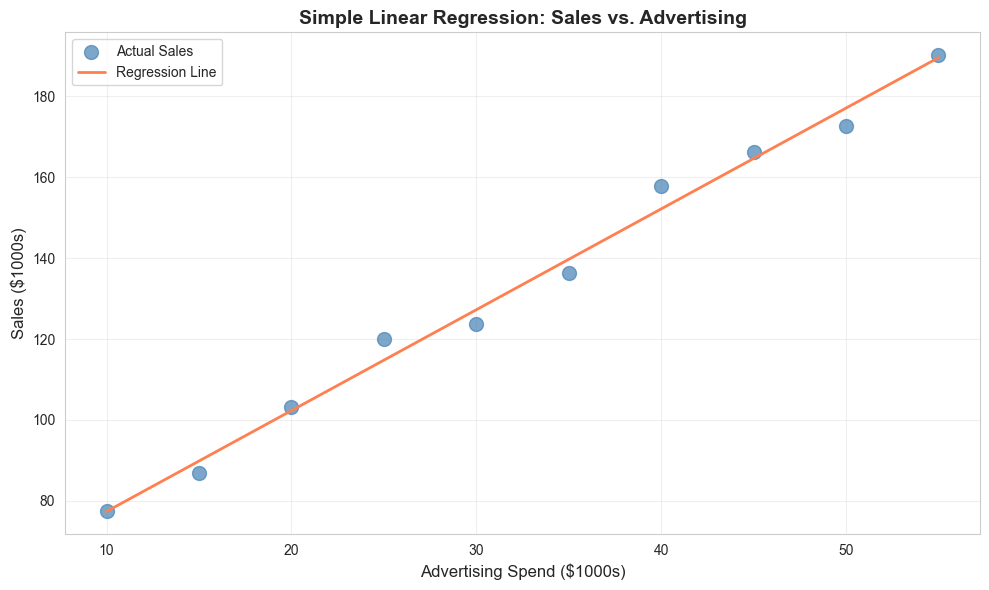
Intercept (β₀): $52.46k
Slope (β₁): $2.49k per $1k advertising
Interpretation: Each $1,000 increase in advertising is associated with $2493 increase in sales
Multiple Linear Regression
Multiple linear regression extends the model to include multiple predictors:
Y = β₀ + β₁X₁ + β₂X₂ + ... + βₙXₙ + ε
This allows us to:
- Control for confounding variables
- Understand the independent effect of each predictor
- Make more accurate predictions
- Model complex business relationships
Business Example: Predicting sales based on advertising, price, and seasonality.
# Multiple regression example
np.random.seed(42)
n = 100
# Generate synthetic business data
data = pd.DataFrame({
'advertising': np.random.uniform(10, 100, n),
'price': np.random.uniform(20, 50, n),
'competitor_price': np.random.uniform(20, 50, n),
'season': np.random.choice([0, 1, 2, 3], n) # 0=Q1, 1=Q2, 2=Q3, 3=Q4
})
# Generate sales with known relationships
data['sales'] = (100 +
1.5 * data['advertising'] +
-2.0 * data['price'] +
1.0 * data['competitor_price'] +
10 * (data['season'] == 3) + # Q4 boost
np.random.normal(0, 10, n))
# Prepare features
X = data[['advertising', 'price', 'competitor_price', 'season']]
y = data['sales']
# Split data
X_train, X_test, y_train, y_test = train_test_split(X, y, test_size=0.2, random_state=42)
# Fit model
model = LinearRegression()
model.fit(X_train, y_train)
# Predictions
y_pred_train = model.predict(X_train)
y_pred_test = model.predict(X_test)
# Coefficients
coef_df = pd.DataFrame({
'Feature': X.columns,
'Coefficient': model.coef_,
'Abs_Coefficient': np.abs(model.coef_)
}).sort_values('Abs_Coefficient', ascending=False)
print("\n=== Multiple Regression Results ===")
print(f"Intercept: {model.intercept_:.2f}")
print("\nCoefficients:")
print(coef_df.to_string(index=False))
=== Multiple Regression Results ===
Intercept: 96.12
Coefficients:
Feature Coefficient Abs_Coefficient
season 2.333993 2.333993
price -1.948938 1.948938
advertising 1.507553 1.507553
competitor_price 1.020550 1.020550
11.3 Assumptions and Diagnostics
Linear regression relies on several key assumptions. Violating these assumptions can lead to unreliable results and poor predictions.
Key Assumptions
- Linearity : The relationship between X and Y is linear
- Independence : Observations are independent of each other
- Homoscedasticity : Constant variance of errors across all levels of X
- Normality : Errors are normally distributed
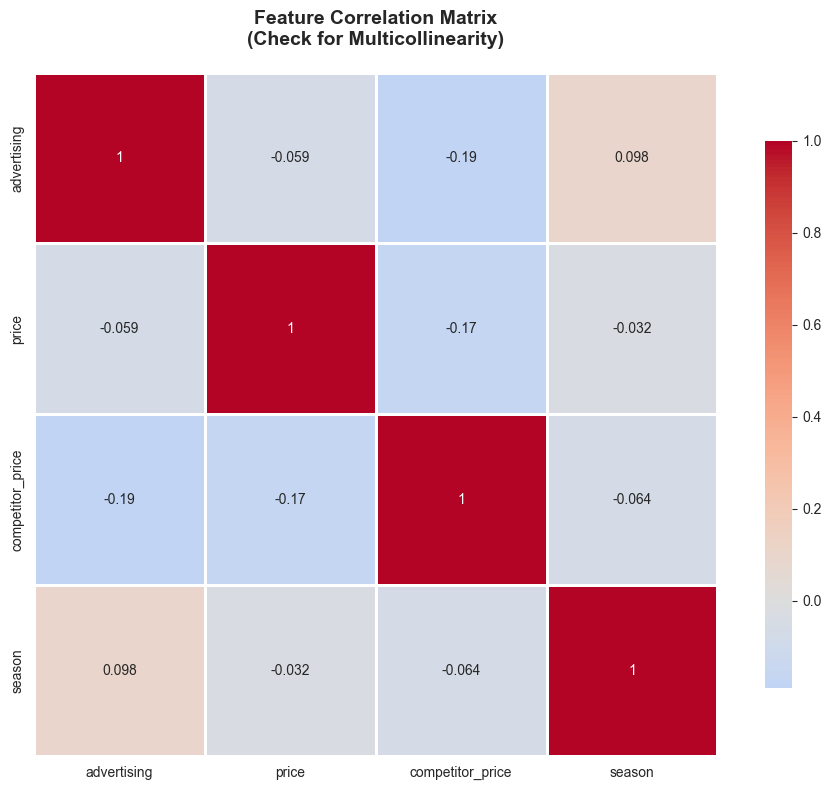
- No multicollinearity : Independent variables are not highly correlated with each other
Diagnostic Checks and Visualizations
# Calculate residuals
residuals_train = y_train - y_pred_train
residuals_test = y_test - y_pred_test
# Create comprehensive diagnostic plots
fig, axes = plt.subplots(2, 3, figsize=(16, 10))
fig.suptitle('Regression Diagnostics Dashboard', fontsize=16, fontweight='bold', y=1.00)
# 1. Actual vs. Predicted
axes[0, 0].scatter(y_train, y_pred_train, alpha=0.6, color='steelblue', label='Train')
axes[0, 0].scatter(y_test, y_pred_test, alpha=0.6, color='coral', label='Test')
axes[0, 0].plot([y.min(), y.max()], [y.min(), y.max()], 'k--', lw=2, label='Perfect Fit')
axes[0, 0].set_xlabel('Actual Sales', fontsize=11)
axes[0, 0].set_ylabel('Predicted Sales', fontsize=11)
axes[0, 0].set_title('Actual vs. Predicted Values', fontweight='bold')
axes[0, 0].legend()
axes[0, 0].grid(alpha=0.3)
# 2. Residuals vs. Fitted (Homoscedasticity check)
axes[0, 1].scatter(y_pred_train, residuals_train, alpha=0.6, color='steelblue')
axes[0, 1].axhline(y=0, color='red', linestyle='--', linewidth=2)
axes[0, 1].set_xlabel('Fitted Values', fontsize=11)
axes[0, 1].set_ylabel('Residuals', fontsize=11)
axes[0, 1].set_title('Residuals vs. Fitted (Check Homoscedasticity)', fontweight='bold')
axes[0, 1].grid(alpha=0.3)
# 3. Q-Q Plot (Normality check)
stats.probplot(residuals_train, dist="norm", plot=axes[0, 2])
axes[0, 2].set_title('Q-Q Plot (Check Normality)', fontweight='bold')
axes[0, 2].grid(alpha=0.3)
# 4. Residual Distribution
axes[1, 0].hist(residuals_train, bins=20, color='steelblue', alpha=0.7, edgecolor='black')
axes[1, 0].axvline(x=0, color='red', linestyle='--', linewidth=2)
axes[1, 0].set_xlabel('Residuals', fontsize=11)
axes[1, 0].set_ylabel('Frequency', fontsize=11)
axes[1, 0].set_title('Distribution of Residuals', fontweight='bold')
axes[1, 0].grid(alpha=0.3)
# 5. Feature Importance (Coefficient Magnitude)
coef_plot = coef_df.copy()
colors = ['coral' if c < 0 else 'steelblue' for c in coef_plot['Coefficient']]
axes[1, 1].barh(coef_plot['Feature'], coef_plot['Coefficient'], color=colors, alpha=0.7)
axes[1, 1].axvline(x=0, color='black', linestyle='-', linewidth=1)
axes[1, 1].set_xlabel('Coefficient Value', fontsize=11)
axes[1, 1].set_title('Feature Coefficients', fontweight='bold')
axes[1, 1].grid(alpha=0.3, axis='x')
# 6. Scale-Location Plot (Spread-Location)
standardized_residuals = np.sqrt(np.abs(residuals_train / np.std(residuals_train)))
axes[1, 2].scatter(y_pred_train, standardized_residuals, alpha=0.6, color='steelblue')
axes[1, 2].set_xlabel('Fitted Values', fontsize=11)
axes[1, 2].set_ylabel('√|Standardized Residuals|', fontsize=11)
axes[1, 2].set_title('Scale-Location Plot', fontweight='bold')
axes[1, 2].grid(alpha=0.3)
plt.tight_layout()
plt.show()
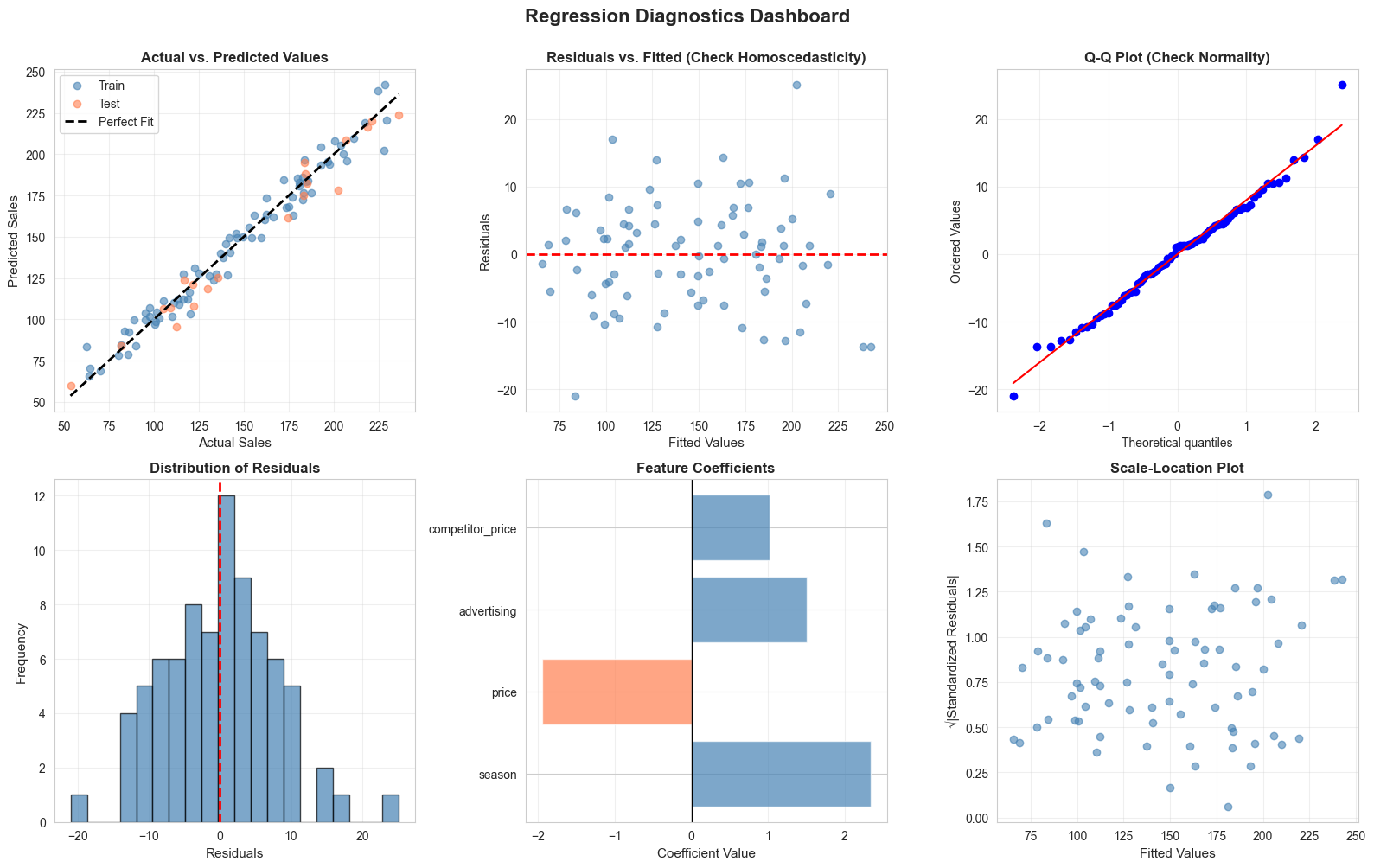
Interpreting Diagnostic Plots
|
Plot |
What to Look For |
Red Flags |
|
Actual vs. Predicted |
Points close to diagonal line |
Systematic deviations, clusters away from line |
|
Residuals vs. Fitted |
Random scatter around zero |
Patterns (curved, funnel-shaped), non-constant variance |
|
Q-Q Plot |
Points follow diagonal line |
Heavy tails, S-curves, systematic deviations |
|
Residual Distribution |
Bell-shaped, centered at zero |
Skewness, multiple peaks, outliers |
|
Scale-Location |
Horizontal line, even spread |
Upward/downward trend (heteroscedasticity) |
Multicollinearity Check
# Calculate correlation matrix
correlation_matrix = X_train.corr()
# Visualize correlations
plt.figure(figsize=(10, 8))
sns.heatmap(correlation_matrix, annot=True, cmap='coolwarm', center=0,
square=True, linewidths=1, cbar_kws={"shrink": 0.8})
plt.title('Feature Correlation Matrix\n(Check for Multicollinearity)',
fontsize=14, fontweight='bold', pad=20)
plt.tight_layout()
plt.show()
# Calculate Variance Inflation Factor (VIF)
from statsmodels.stats.outliers_influence import variance_inflation_factor
vif_data = pd.DataFrame()
vif_data["Feature"] = X_train.columns
vif_data["VIF"] = [variance_inflation_factor(X_train.values, i) for i in range(X_train.shape[1])]
vif_data = vif_data.sort_values('VIF', ascending=False)
print("\n=== Variance Inflation Factor (VIF) ===")
print(vif_data.to_string(index=False))
print("\nInterpretation:")
print("VIF < 5: Low multicollinearity")
print("VIF 5-10: Moderate multicollinearity")
print("VIF > 10: High multicollinearity (consider removing variable)")
11.4 Regularized Regression
When models have many features or multicollinearity issues, regularization techniques can improve performance by penalizing large coefficients.
Why Regularization?
Problems with Standard Linear Regression:
- Overfitting : Model fits training data too closely, performs poorly on new data
- Multicollinearity : Correlated predictors lead to unstable, unreliable coefficients
- High variance : Small changes in data lead to large changes in coefficients
Regularization Solution: Add a penalty term to the loss function that discourages large coefficients, creating simpler, more generalizable models.
Ridge Regression (L2 Regularization)
Formula : Minimize: RSS + α × Σ(βᵢ²)
Characteristics:
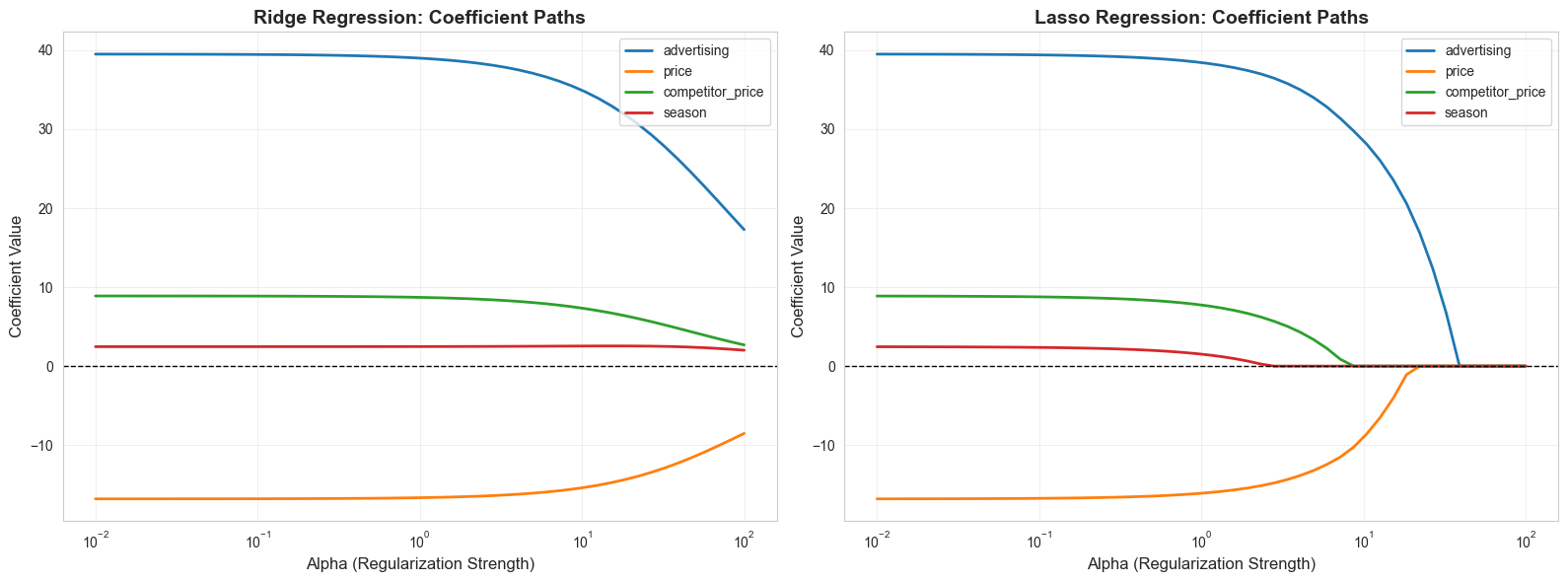
- Shrinks coefficients toward zero but never exactly to zero
- Keeps all features in the model
- Works well when many features have small-to-medium effects
- Business use case : Revenue forecasting with many correlated marketing channels
Tuning parameter (α):
- α = 0: Standard linear regression
- α → ∞: All coefficients → 0
- Optimal α found through cross-validation
Lasso Regression (L1 Regularization)
Formula : Minimize: RSS + α × Σ|βᵢ|
Characteristics:
- Can shrink coefficients exactly to zero (feature selection)
- Creates sparse models (fewer features)
- Works well when only a few features truly matter
- Business use case : Customer satisfaction with many potential drivers, need to identify key factors
Elastic Net
Combines Ridge and Lasso penalties, balancing feature selection with coefficient shrinkage.
Comparison
|
Aspect |
Ridge |
Lasso |
Elastic Net |
|
Penalty |
L2 (squared) |
L1 (absolute) |
L1 + L2 |
|
Feature Selection |
No |
Yes |
Yes |
|
Multicollinearity |
Handles well |
Can be unstable |
Handles well |
|
Interpretability |
All features retained |
Sparse model |
Sparse model |
|
Use When |
Many relevant features |
Few relevant features |
Many correlated features |
# Compare OLS, Ridge, and Lasso
from sklearn.linear_model import Ridge, Lasso, ElasticNet
from sklearn.preprocessing import StandardScaler
# Standardize features (important for regularization)
scaler = StandardScaler()
X_train_scaled = scaler.fit_transform(X_train)
X_test_scaled = scaler.transform(X_test)
# Fit models
models = {
'OLS': LinearRegression(),
'Ridge (α=1.0)': Ridge(alpha=1.0),
'Ridge (α=10.0)': Ridge(alpha=10.0),
'Lasso (α=1.0)': Lasso(alpha=1.0),
'Lasso (α=0.1)': Lasso(alpha=0.1),
'Elastic Net': ElasticNet(alpha=1.0, l1_ratio=0.5)
}
results = []
for name, model in models.items():
model.fit(X_train_scaled, y_train)
train_score = model.score(X_train_scaled, y_train)
test_score = model.score(X_test_scaled, y_test)
y_pred = model.predict(X_test_scaled)
rmse = np.sqrt(mean_squared_error(y_test, y_pred))
mae = mean_absolute_error(y_test, y_pred)
results.append({
'Model': name,
'Train R²': train_score,
'Test R²': test_score,
'RMSE': rmse,
'MAE': mae,
'Non-zero Coefs': np.sum(model.coef_ != 0) if hasattr(model, 'coef_') else len(X.columns)
})
results_df = pd.DataFrame(results)
print("\n=== Model Comparison: OLS vs. Regularized Regression ===")
print(results_df.to_string(index=False))
# Visualize coefficient paths
alphas = np.logspace(-2, 2, 50)
ridge_coefs = []
lasso_coefs = []
for alpha in alphas:
ridge = Ridge(alpha=alpha)
ridge.fit(X_train_scaled, y_train)
ridge_coefs.append(ridge.coef_)
lasso = Lasso(alpha=alpha, max_iter=10000)
lasso.fit(X_train_scaled, y_train)
lasso_coefs.append(lasso.coef_)
ridge_coefs = np.array(ridge_coefs)
lasso_coefs = np.array(lasso_coefs)
# Plot coefficient paths
fig, (ax1, ax2) = plt.subplots(1, 2, figsize=(16, 6))
for i in range(X_train.shape[1]):
ax1.plot(alphas, ridge_coefs[:, i], label=X.columns[i], linewidth=2)
ax1.set_xscale('log')
ax1.set_xlabel('Alpha (Regularization Strength)', fontsize=12)
ax1.set_ylabel('Coefficient Value', fontsize=12)
ax1.set_title('Ridge Regression: Coefficient Paths', fontsize=14, fontweight='bold')
ax1.legend()
ax1.grid(alpha=0.3)
ax1.axhline(y=0, color='black', linestyle='--', linewidth=1)
for i in range(X_train.shape[1]):
ax2.plot(alphas, lasso_coefs[:, i], label=X.columns[i], linewidth=2)
ax2.set_xscale('log')
ax2.set_xlabel('Alpha (Regularization Strength)', fontsize=12)
ax2.set_ylabel('Coefficient Value', fontsize=12)
ax2.set_title('Lasso Regression: Coefficient Paths', fontsize=14, fontweight='bold')
ax2.legend()
ax2.grid(alpha=0.3)
ax2.axhline(y=0, color='black', linestyle='--', linewidth=1)
plt.tight_layout()
plt.show()
print("\nKey Observation:")
print("- Ridge: Coefficients shrink gradually but never reach zero")
print("- Lasso: Coefficients can become exactly zero (feature selection)")
=== Model Comparison: OLS vs. Regularized Regression ===
Model Train R² Test R² RMSE MAE Non-zero Coefs
OLS 0.968960 0.960297 9.999062 7.694220 4
Ridge (α=1.0) 0.968810 0.959974 10.039659 7.804371 4
Ridge (α=10.0) 0.956945 0.944189 11.855223 10.059110 4
Lasso (α=1.0) 0.967023 0.955289 10.610981 8.329731 4
Lasso (α=0.1) 0.968941 0.959941 10.043750 7.745395 4
Elastic Net 0.854847 0.822449 21.145101 17.363930 4
11.5 Non-Linear Relationships and Transformations
Real business relationships are often non-linear. Transformations allow linear regression to model these patterns.
Common Non-Linear Patterns in Business
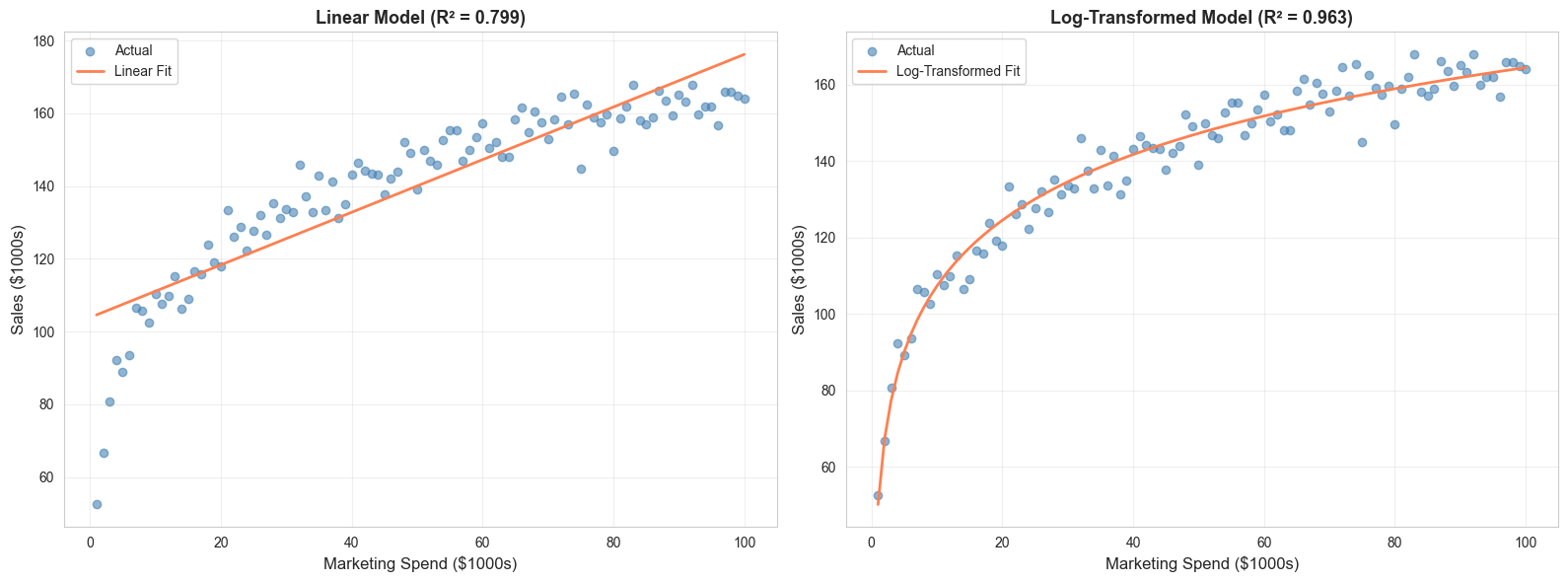
- Diminishing Returns : Marketing spend impact (logarithmic)
- Exponential Growth : Viral adoption, compound growth
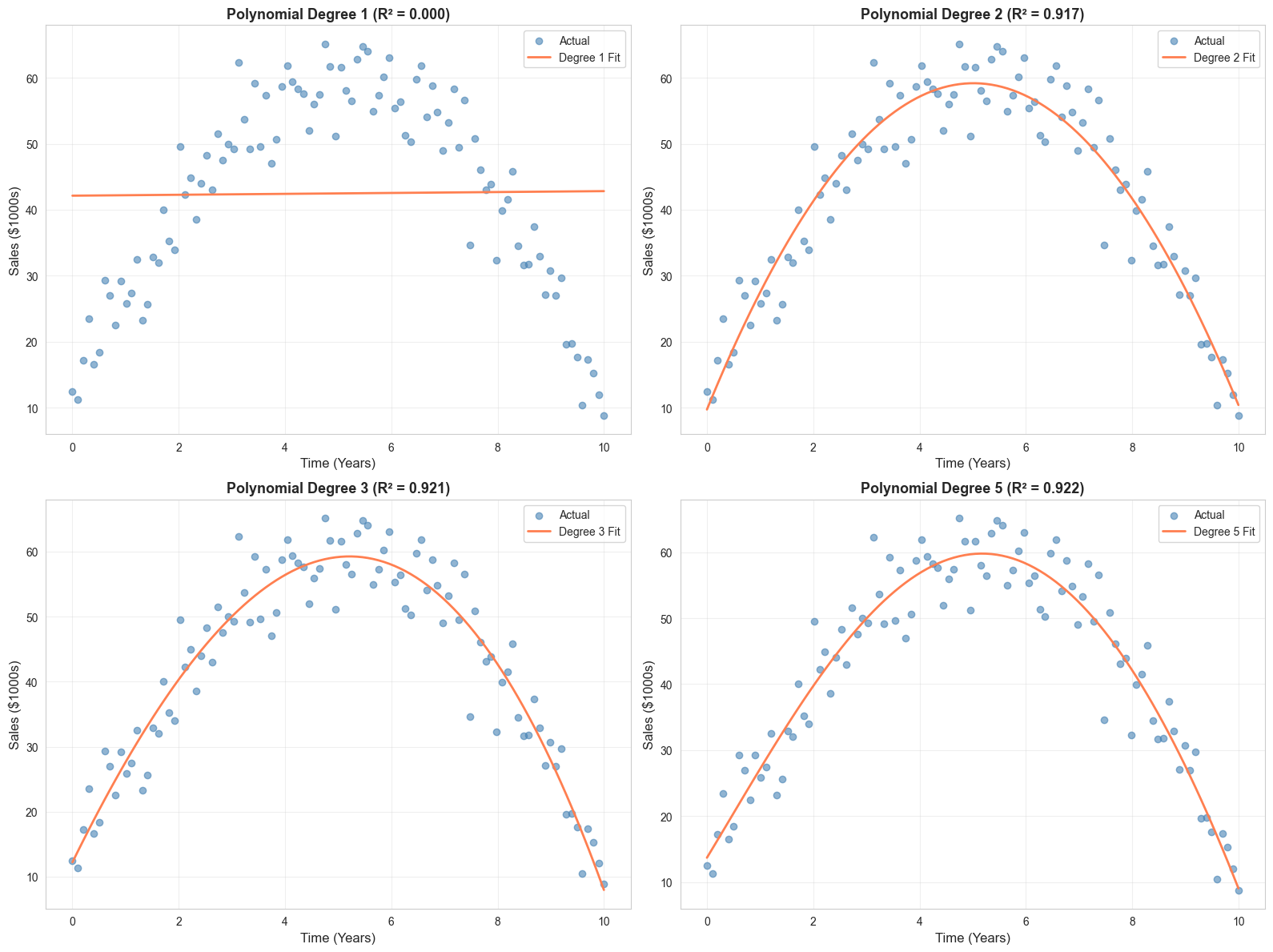
- Polynomial : Sales lifecycle (introduction, growth, maturity, decline)
- Interaction Effects : Combined impact of price and quality
Transformation Techniques
1. Logarithmic Transformation
Use when : Diminishing returns, right-skewed data, multiplicative relationships
# Example: Marketing spend with diminishing returns
np.random.seed(42)
spend = np.linspace(1, 100, 100)
sales_log = 50 + 25 * np.log(spend) + np.random.normal(0, 5, 100)
# Compare linear vs. log transformation
fig, (ax1, ax2) = plt.subplots(1, 2, figsize=(16, 6))
# Linear model (poor fit)
model_linear = LinearRegression()
model_linear.fit(spend.reshape(-1, 1), sales_log)
pred_linear = model_linear.predict(spend.reshape(-1, 1))
ax1.scatter(spend, sales_log, alpha=0.6, color='steelblue', label='Actual')
ax1.plot(spend, pred_linear, color='coral', linewidth=2, label='Linear Fit')
ax1.set_xlabel('Marketing Spend ($1000s)', fontsize=12)
ax1.set_ylabel('Sales ($1000s)', fontsize=12)
ax1.set_title(f'Linear Model (R² = {model_linear.score(spend.reshape(-1, 1), sales_log):.3f})',
fontsize=13, fontweight='bold')
ax1.legend()
ax1.grid(alpha=0.3)
# Log transformation (better fit)
spend_log = np.log(spend).reshape(-1, 1)
model_log = LinearRegression()
model_log.fit(spend_log, sales_log)
pred_log = model_log.predict(spend_log)
ax2.scatter(spend, sales_log, alpha=0.6, color='steelblue', label='Actual')
ax2.plot(spend, pred_log, color='coral', linewidth=2, label='Log-Transformed Fit')
ax2.set_xlabel('Marketing Spend ($1000s)', fontsize=12)
ax2.set_ylabel('Sales ($1000s)', fontsize=12)
ax2.set_title(f'Log-Transformed Model (R² = {model_log.score(spend_log, sales_log):.3f})',
fontsize=13, fontweight='bold')
ax2.legend()
ax2.grid(alpha=0.3)
plt.tight_layout()
plt.show()
print(f"\nImprovement in R²: {model_log.score(spend_log, sales_log) - model_linear.score(spend.reshape(-1, 1), sales_log):.3f}")
2. Polynomial Features
Use when : Curved relationships, lifecycle patterns
# Example: Product lifecycle
np.random.seed(42)
time = np.linspace(0, 10, 100)
sales_poly = -2 * time**2 + 20 * time + 10 + np.random.normal(0, 5, 100)
# Fit polynomial models
degrees = [1, 2, 3, 5]
fig, axes = plt.subplots(2, 2, figsize=(16, 12))
axes = axes.ravel()
for idx, degree in enumerate(degrees):
poly = PolynomialFeatures(degree=degree)
time_poly = poly.fit_transform(time.reshape(-1, 1))
model = LinearRegression()
model.fit(time_poly, sales_poly)
pred = model.predict(time_poly)
r2 = model.score(time_poly, sales_poly)
axes[idx].scatter(time, sales_poly, alpha=0.6, color='steelblue', label='Actual')
axes[idx].plot(time, pred, color='coral', linewidth=2, label=f'Degree {degree} Fit')
axes[idx].set_xlabel('Time (Years)', fontsize=12)
axes[idx].set_ylabel('Sales ($1000s)', fontsize=12)
axes[idx].set_title(f'Polynomial Degree {degree} (R² = {r2:.3f})',
fontsize=13, fontweight='bold')
axes[idx].legend()
axes[idx].grid(alpha=0.3)
plt.tight_layout()
plt.show()
print("\nNote: Higher degree polynomials fit training data better but may overfit.")
print("Use cross-validation to select optimal degree.")
3. Interaction Terms
Use when : Combined effects of variables
# Example: Price and Quality interaction
np.random.seed(42)
n = 200
price = np.random.uniform(10, 50, n)
quality = np.random.uniform(1, 10, n)
# Sales depend on price, quality, AND their interaction
sales_interaction = (100 - 2 * price + 10 * quality +
0.5 * price * quality + # Interaction: high quality justifies high price
np.random.normal(0, 10, n))
# Model without interaction
X_no_interaction = np.column_stack([price, quality])
model_no_int = LinearRegression()
model_no_int.fit(X_no_interaction, sales_interaction)
r2_no_int = model_no_int.score(X_no_interaction, sales_interaction)
# Model with interaction
X_with_interaction = np.column_stack([price, quality, price * quality])
model_with_int = LinearRegression()
model_with_int.fit(X_with_interaction, sales_interaction)
r2_with_int = model_with_int.score(X_with_interaction, sales_interaction)
print("\n=== Interaction Effects ===")
print(f"R² without interaction: {r2_no_int:.3f}")
print(f"R² with interaction: {r2_with_int:.3f}")
print(f"Improvement: {r2_with_int - r2_no_int:.3f}")
print("\nInterpretation: The effect of price on sales depends on quality level.")
print("High-quality products can command higher prices without hurting sales.")
=== Interaction Effects ===
R² without interaction: 0.923
R² with interaction: 0.977
Improvement: 0.055
Common Business Transformations
|
Transformation |
Formula |
Business Use Case |
|
Log |
log(X) |
Diminishing returns (marketing spend, experience) |
|
Square Root |
√X |
Moderate non-linearity, count data |
|
Square |
X² |
Accelerating effects, compound growth |
|
Reciprocal |
1/X |
Inverse relationships (price elasticity) |
|
Box-Cox |
Automated |
Normalize skewed distributions |
|
Interaction |
X₁ × X₂ |
Combined effects (price × quality) |
|
Polynomial |
X, X², X³ |
Lifecycle curves, complex patterns |
11.6 Implementing Regression Models in Python
Complete Workflow: Customer Lifetime Value (CLTV) Prediction
Let's build a comprehensive CLTV prediction model using the transactions dataset, demonstrating the full regression workflow from data preparation through model evaluation.
# Load the transactions data
df = pd.read_csv('transactions.csv')
print("=== Dataset Overview ===")
print(df.head(10))
print(f"\nShape: {df.shape}")
print(f"\nData types:\n{df.dtypes}")
print(f"\nMissing values:\n{df.isnull().sum()}")
print(f"\nBasic statistics:\n{df.describe()}")
# Step 1: Data Preparation and Feature Engineering
# Convert transaction_date to datetime
df['transaction_date'] = pd.to_datetime(df['transaction_date'])
# Calculate customer-level features for CLTV prediction
customer_features = df.groupby('customer_id').agg({
'transaction_id': 'count', # Number of transactions
'amount': ['sum', 'mean', 'std', 'min', 'max'], # Spending patterns
'transaction_date': ['min', 'max'] # First and last purchase
}).reset_index()
# Flatten column names
customer_features.columns = ['customer_id', 'num_transactions', 'total_spent',
'avg_transaction', 'std_transaction', 'min_transaction',
'max_transaction', 'first_purchase', 'last_purchase']
# Calculate additional features
customer_features['customer_lifetime_days'] = (
customer_features['last_purchase'] - customer_features['first_purchase']
).dt.days
# Avoid division by zero
customer_features['customer_lifetime_days'] = customer_features['customer_lifetime_days'].replace(0, 1)
customer_features['purchase_frequency'] = (
customer_features['num_transactions'] / customer_features['customer_lifetime_days'] * 30
) # Purchases per month
customer_features['spending_velocity'] = (
customer_features['total_spent'] / customer_features['customer_lifetime_days'] * 30
) # Spending per month
# Calculate recency (days since last purchase)
reference_date = customer_features['last_purchase'].max()
customer_features['recency_days'] = (
reference_date - customer_features['last_purchase']
).dt.days
# Calculate coefficient of variation (spending consistency)
customer_features['spending_cv'] = (
customer_features['std_transaction'] / customer_features['avg_transaction']
).fillna(0)
# Calculate range ratio (spending variability)
customer_features['spending_range_ratio'] = (
customer_features['max_transaction'] / customer_features['min_transaction']
).replace([np.inf, -np.inf], 1)
# Time-based features
customer_features['days_since_first_purchase'] = (
reference_date - customer_features['first_purchase']
).dt.days
customer_features['first_purchase_year'] = customer_features['first_purchase'].dt.year
customer_features['first_purchase_month'] = customer_features['first_purchase'].dt.month
customer_features['first_purchase_quarter'] = customer_features['first_purchase'].dt.quarter
# Target variable: Future CLTV (we'll use total_spent as proxy, but in practice
# you'd predict future value based on historical behavior)
# For demonstration, let's predict total spending based on early behavior
# Filter customers with at least 3 transactions for meaningful prediction
customer_features = customer_features[customer_features['num_transactions'] >= 3].copy()
print("\n=== Engineered Features ===")
print(customer_features.head())
print(f"\nFeature set shape: {customer_features.shape}")
print(f"\nFeature statistics:\n{customer_features.describe()}")
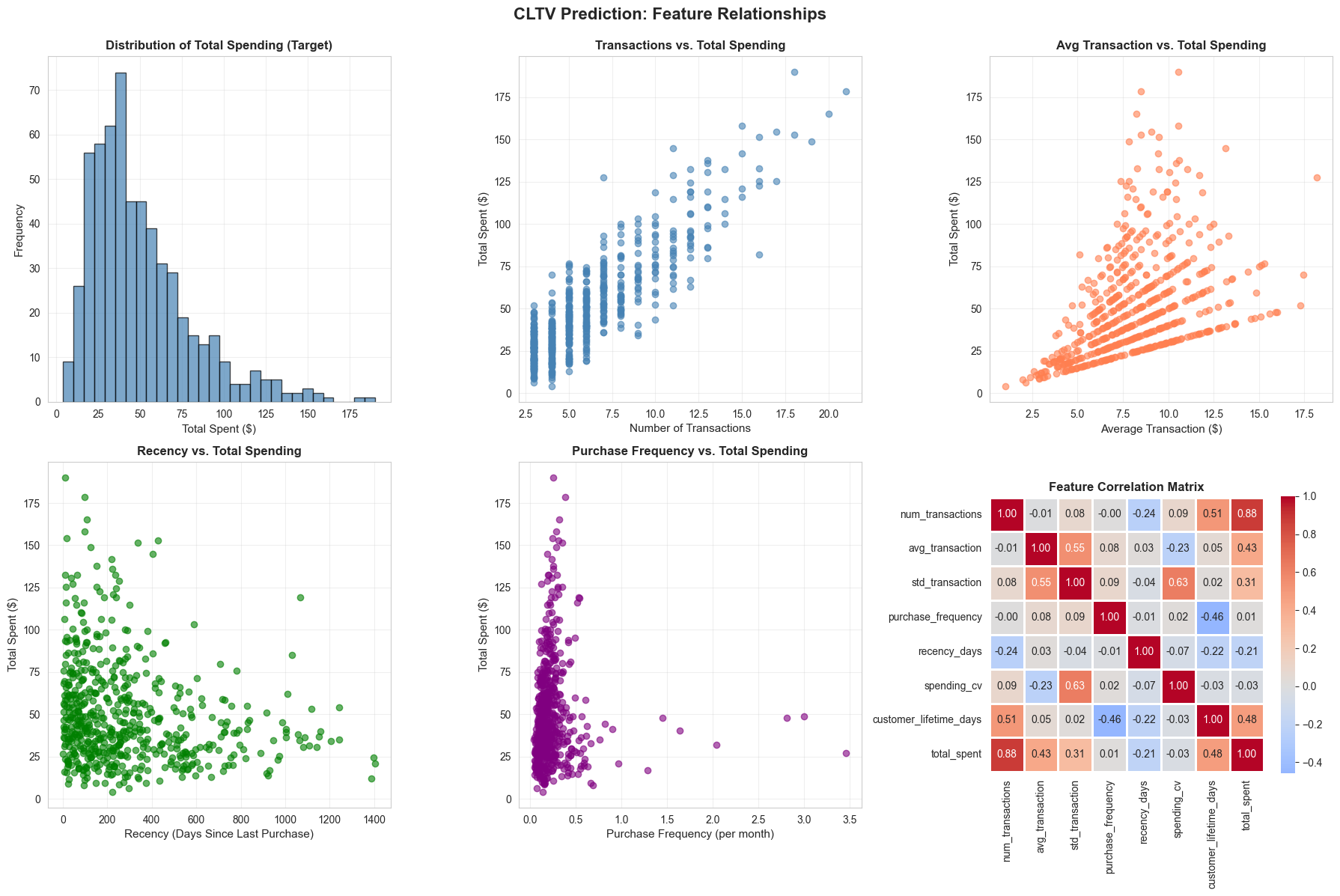
# Step 2: Exploratory Data Analysis
# Visualize key relationships
fig, axes = plt.subplots(2, 3, figsize=(18, 12))
fig.suptitle('CLTV Prediction: Feature Relationships', fontsize=16, fontweight='bold', y=0.995)
# 1. Total Spent Distribution
axes[0, 0].hist(customer_features['total_spent'], bins=30, color='steelblue',
alpha=0.7, edgecolor='black')
axes[0, 0].set_xlabel('Total Spent ($)', fontsize=11)
axes[0, 0].set_ylabel('Frequency', fontsize=11)
axes[0, 0].set_title('Distribution of Total Spending (Target)', fontweight='bold')
axes[0, 0].grid(alpha=0.3)
# 2. Number of Transactions vs. Total Spent
axes[0, 1].scatter(customer_features['num_transactions'],
customer_features['total_spent'],
alpha=0.6, color='steelblue')
axes[0, 1].set_xlabel('Number of Transactions', fontsize=11)
axes[0, 1].set_ylabel('Total Spent ($)', fontsize=11)
axes[0, 1].set_title('Transactions vs. Total Spending', fontweight='bold')
axes[0, 1].grid(alpha=0.3)
# 3. Average Transaction vs. Total Spent
axes[0, 2].scatter(customer_features['avg_transaction'],
customer_features['total_spent'],
alpha=0.6, color='coral')
axes[0, 2].set_xlabel('Average Transaction ($)', fontsize=11)
axes[0, 2].set_ylabel('Total Spent ($)', fontsize=11)
axes[0, 2].set_title('Avg Transaction vs. Total Spending', fontweight='bold')
axes[0, 2].grid(alpha=0.3)
# 4. Recency vs. Total Spent
axes[1, 0].scatter(customer_features['recency_days'],
customer_features['total_spent'],
alpha=0.6, color='green')
axes[1, 0].set_xlabel('Recency (Days Since Last Purchase)', fontsize=11)
axes[1, 0].set_ylabel('Total Spent ($)', fontsize=11)
axes[1, 0].set_title('Recency vs. Total Spending', fontweight='bold')
axes[1, 0].grid(alpha=0.3)
# 5. Purchase Frequency vs. Total Spent
axes[1, 1].scatter(customer_features['purchase_frequency'],
customer_features['total_spent'],
alpha=0.6, color='purple')
axes[1, 1].set_xlabel('Purchase Frequency (per month)', fontsize=11)
axes[1, 1].set_ylabel('Total Spent ($)', fontsize=11)
axes[1, 1].set_title('Purchase Frequency vs. Total Spending', fontweight='bold')
axes[1, 1].grid(alpha=0.3)
# 6. Correlation Heatmap
feature_cols = ['num_transactions', 'avg_transaction', 'std_transaction',
'purchase_frequency', 'recency_days', 'spending_cv',
'customer_lifetime_days', 'total_spent']
corr_matrix = customer_features[feature_cols].corr()
sns.heatmap(corr_matrix, annot=True, fmt='.2f', cmap='coolwarm', center=0,
square=True, linewidths=1, cbar_kws={"shrink": 0.8}, ax=axes[1, 2])
axes[1, 2].set_title('Feature Correlation Matrix', fontweight='bold')
plt.tight_layout()
plt.show()
# Step 3: Data Preprocessing
# Select features for modeling
feature_columns = [
'num_transactions',
'avg_transaction',
'std_transaction',
'min_transaction',
'max_transaction',
'customer_lifetime_days',
'purchase_frequency',
'spending_velocity',
'recency_days',
'spending_cv',
'spending_range_ratio',
'days_since_first_purchase',
'first_purchase_quarter'
]
X = customer_features[feature_columns].copy()
y = customer_features['total_spent'].copy()
# Handle any remaining missing values
X = X.fillna(X.median())
# Check for infinite values
X = X.replace([np.inf, -np.inf], np.nan)
X = X.fillna(X.median())
print("\n=== Feature Matrix ===")
print(f"Shape: {X.shape}")
print(f"Missing values: {X.isnull().sum().sum()}")
print(f"Infinite values: {np.isinf(X.values).sum()}")
# Split data (80/20 train/test)
X_train, X_test, y_train, y_test = train_test_split(
X, y, test_size=0.2, random_state=42
)
print(f"\nTrain set: {X_train.shape[0]} customers")
print(f"Test set: {X_test.shape[0]} customers")
# Standardize features (important for regularization)
scaler = StandardScaler()
X_train_scaled = scaler.fit_transform(X_train)
X_test_scaled = scaler.transform(X_test)
# Convert back to DataFrame for easier interpretation
X_train_scaled_df = pd.DataFrame(X_train_scaled, columns=X_train.columns, index=X_train.index)
X_test_scaled_df = pd.DataFrame(X_test_scaled, columns=X_test.columns, index=X_test.index)
# Step 4: Model Training and Comparison
# Train multiple models
models = {
'Linear Regression': LinearRegression(),
'Ridge (α=0.1)': Ridge(alpha=0.1),
'Ridge (α=1.0)': Ridge(alpha=1.0),
'Ridge (α=10.0)': Ridge(alpha=10.0),
'Lasso (α=0.1)': Lasso(alpha=0.1, max_iter=10000),
'Lasso (α=1.0)': Lasso(alpha=1.0, max_iter=10000),
'Elastic Net': ElasticNet(alpha=1.0, l1_ratio=0.5, max_iter=10000)
}
model_results = []
for name, model in models.items():
# Fit model
model.fit(X_train_scaled, y_train)
# Predictions
y_train_pred = model.predict(X_train_scaled)
y_test_pred = model.predict(X_test_scaled)
# Metrics
train_r2 = r2_score(y_train, y_train_pred)
test_r2 = r2_score(y_test, y_test_pred)
train_rmse = np.sqrt(mean_squared_error(y_train, y_train_pred))
test_rmse = np.sqrt(mean_squared_error(y_test, y_test_pred))
train_mae = mean_absolute_error(y_train, y_train_pred)
test_mae = mean_absolute_error(y_test, y_test_pred)
# Cross-validation
cv_scores = cross_val_score(model, X_train_scaled, y_train, cv=5,
scoring='r2')
# Count non-zero coefficients
if hasattr(model, 'coef_'):
non_zero_coefs = np.sum(np.abs(model.coef_) > 1e-5)
else:
non_zero_coefs = len(feature_columns)
model_results.append({
'Model': name,
'Train R²': train_r2,
'Test R²': test_r2,
'CV R² (mean)': cv_scores.mean(),
'CV R² (std)': cv_scores.std(),
'Train RMSE': train_rmse,
'Test RMSE': test_rmse,
'Test MAE': test_mae,
'Non-zero Features': non_zero_coefs
})
results_df = pd.DataFrame(model_results)
print("\n" + "="*100)
print("=== MODEL COMPARISON: CLTV PREDICTION ===")
print("="*100)
print(results_df.to_string(index=False))
print("="*100)
# Select best model (highest test R² with low overfitting)
best_model_name = results_df.loc[results_df['Test R²'].idxmax(), 'Model']
best_model = models[best_model_name]
print(f"\n✓ Best Model: {best_model_name}")
print(f" Test R²: {results_df.loc[results_df['Test R²'].idxmax(), 'Test R²']:.4f}")
print(f" Test RMSE: ${results_df.loc[results_df['Test R²'].idxmax(), 'Test RMSE']:.2f}")
print(f" Test MAE: ${results_df.loc[results_df['Test R²'].idxmax(), 'Test MAE']:.2f}")
====================================================================================================
=== MODEL COMPARISON: CLTV PREDICTION ===
====================================================================================================
Model Train R² Test R² CV R² (mean) CV R² (std) Train RMSE Test RMSE Test MAE Non-zero Features
Linear Regression 0.967205 0.950598 0.962983 0.007999 5.454545 7.083092 4.530615 13
Ridge (α=0.1) 0.967222 0.950442 0.962969 0.008016 5.453203 7.094315 4.531674 13
Ridge (α=1.0) 0.967195 0.950747 0.962955 0.008072 5.455395 7.072408 4.504098 13
Ridge (α=10.0) 0.965879 0.950830 0.960988 0.009285 5.563762 7.066451 4.356930 13
Lasso (α=0.1) 0.966534 0.952139 0.962373 0.008568 5.510103 6.971800 4.402418 12
Lasso (α=1.0) 0.958438 0.947356 0.956966 0.011390 6.140541 7.311841 4.484719 3
Elastic Net 0.876048 0.850403 0.870857 0.031024 10.604347 12.325779 8.402883 13
====================================================================================================
✓ Best Model: Lasso (α=0.1)
Test R²: 0.9521
Test RMSE: $6.97
Test MAE: $4.40
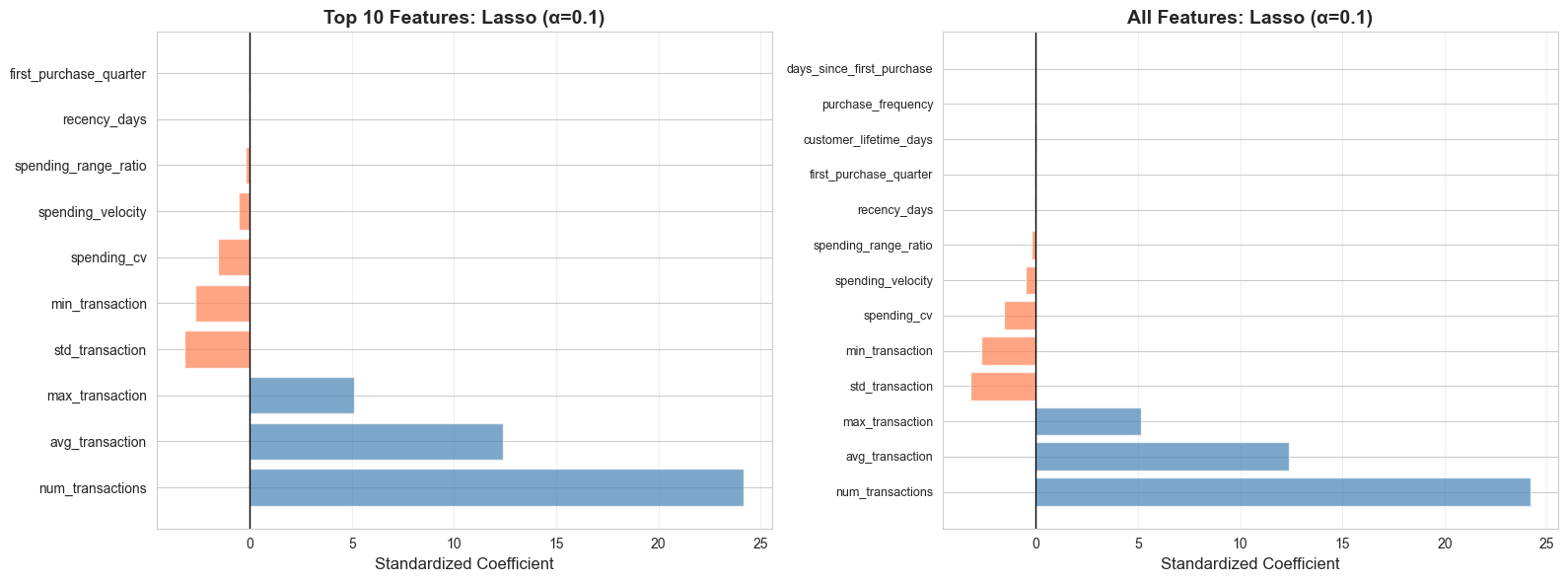
# Step 5: Model Interpretation
# Get feature importance from best model
if hasattr(best_model, 'coef_'):
feature_importance = pd.DataFrame({
'Feature': feature_columns,
'Coefficient': best_model.coef_,
'Abs_Coefficient': np.abs(best_model.coef_)
}).sort_values('Abs_Coefficient', ascending=False)
print("\n=== FEATURE IMPORTANCE (Best Model) ===")
print(feature_importance.to_string(index=False))
# Visualize feature importance
fig, (ax1, ax2) = plt.subplots(1, 2, figsize=(16, 6))
# Top features by absolute coefficient
top_features = feature_importance.head(10)
colors = ['coral' if c < 0 else 'steelblue' for c in top_features['Coefficient']]
ax1.barh(range(len(top_features)), top_features['Coefficient'], color=colors, alpha=0.7)
ax1.set_yticks(range(len(top_features)))
ax1.set_yticklabels(top_features['Feature'])
ax1.axvline(x=0, color='black', linestyle='-', linewidth=1)
ax1.set_xlabel('Standardized Coefficient', fontsize=12)
ax1.set_title(f'Top 10 Features: {best_model_name}', fontsize=14, fontweight='bold')
ax1.grid(alpha=0.3, axis='x')
# All features
colors_all = ['coral' if c < 0 else 'steelblue' for c in feature_importance['Coefficient']]
ax2.barh(range(len(feature_importance)), feature_importance['Coefficient'],
color=colors_all, alpha=0.7)
ax2.set_yticks(range(len(feature_importance)))
ax2.set_yticklabels(feature_importance['Feature'], fontsize=9)
ax2.axvline(x=0, color='black', linestyle='-', linewidth=1)
ax2.set_xlabel('Standardized Coefficient', fontsize=12)
ax2.set_title(f'All Features: {best_model_name}', fontsize=14, fontweight='bold')
ax2.grid(alpha=0.3, axis='x')
plt.tight_layout()
plt.show()
# Step 6: Model Evaluation and Diagnostics
# Get predictions from best model
y_train_pred = best_model.predict(X_train_scaled)
y_test_pred = best_model.predict(X_test_scaled)
# Calculate residuals
train_residuals = y_train - y_train_pred
test_residuals = y_test - y_test_pred
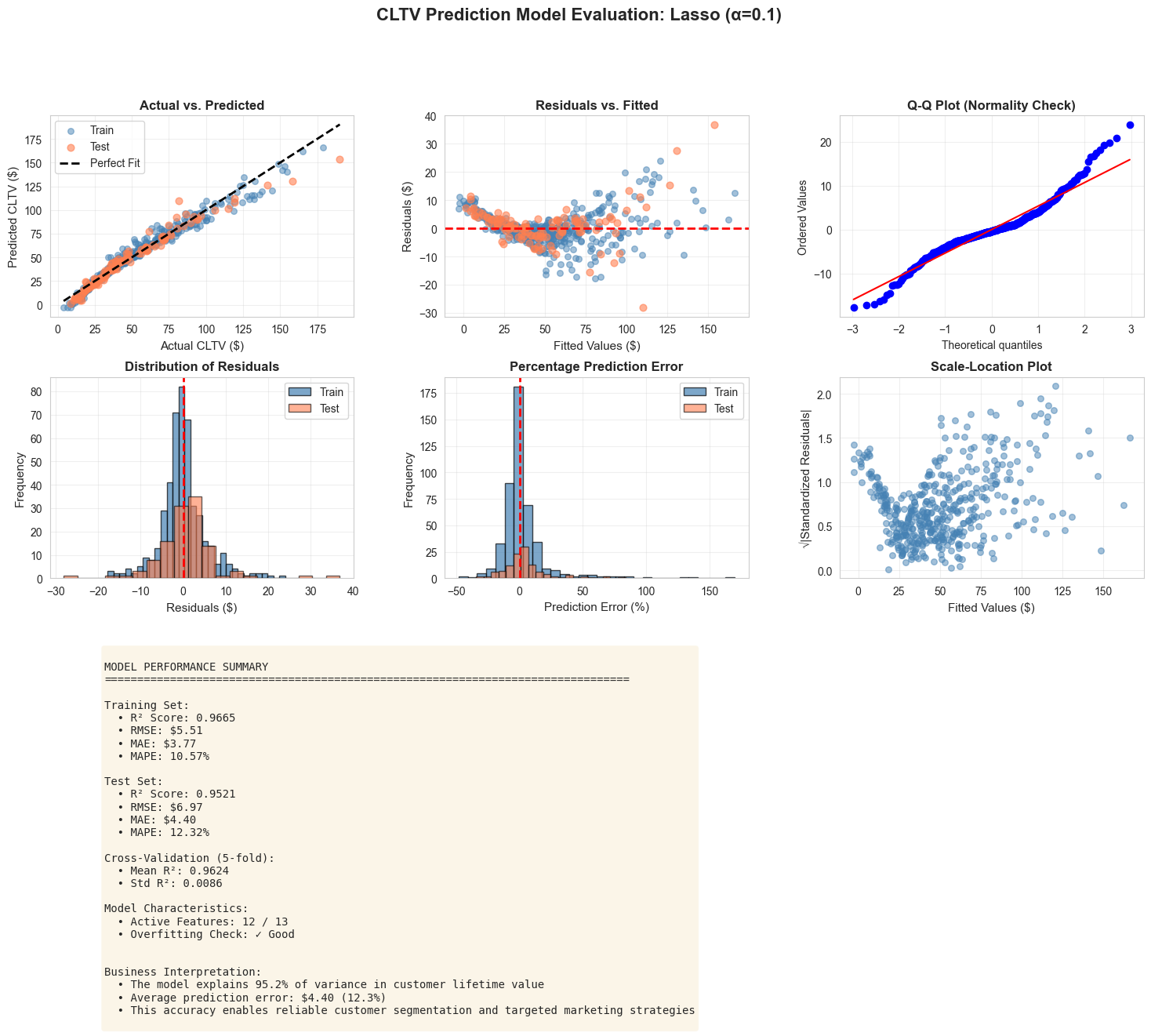
# Comprehensive evaluation dashboard
fig = plt.figure(figsize=(18, 12))
gs = fig.add_gridspec(3, 3, hspace=0.3, wspace=0.3)
fig.suptitle(f'CLTV Prediction Model Evaluation: {best_model_name}',
fontsize=16, fontweight='bold', y=0.995)
# 1. Actual vs. Predicted (Train and Test)
ax1 = fig.add_subplot(gs[0, 0])
ax1.scatter(y_train, y_train_pred, alpha=0.5, color='steelblue', s=30, label='Train')
ax1.scatter(y_test, y_test_pred, alpha=0.6, color='coral', s=40, label='Test')
min_val = min(y_train.min(), y_test.min())
max_val = max(y_train.max(), y_test.max())
ax1.plot([min_val, max_val], [min_val, max_val], 'k--', lw=2, label='Perfect Fit')
ax1.set_xlabel('Actual CLTV ($)', fontsize=11)
ax1.set_ylabel('Predicted CLTV ($)', fontsize=11)
ax1.set_title('Actual vs. Predicted', fontweight='bold')
ax1.legend()
ax1.grid(alpha=0.3)
# 2. Residuals vs. Fitted
ax2 = fig.add_subplot(gs[0, 1])
ax2.scatter(y_train_pred, train_residuals, alpha=0.5, color='steelblue', s=30)
ax2.scatter(y_test_pred, test_residuals, alpha=0.6, color='coral', s=40)
ax2.axhline(y=0, color='red', linestyle='--', linewidth=2)
ax2.set_xlabel('Fitted Values ($)', fontsize=11)
ax2.set_ylabel('Residuals ($)', fontsize=11)
ax2.set_title('Residuals vs. Fitted', fontweight='bold')
ax2.grid(alpha=0.3)
# 3. Q-Q Plot
ax3 = fig.add_subplot(gs[0, 2])
stats.probplot(train_residuals, dist="norm", plot=ax3)
ax3.set_title('Q-Q Plot (Normality Check)', fontweight='bold')
ax3.grid(alpha=0.3)
# 4. Residual Distribution
ax4 = fig.add_subplot(gs[1, 0])
ax4.hist(train_residuals, bins=30, color='steelblue', alpha=0.7, edgecolor='black', label='Train')
ax4.hist(test_residuals, bins=20, color='coral', alpha=0.6, edgecolor='black', label='Test')
ax4.axvline(x=0, color='red', linestyle='--', linewidth=2)
ax4.set_xlabel('Residuals ($)', fontsize=11)
ax4.set_ylabel('Frequency', fontsize=11)
ax4.set_title('Distribution of Residuals', fontweight='bold')
ax4.legend()
ax4.grid(alpha=0.3)
# 5. Prediction Error Distribution
ax5 = fig.add_subplot(gs[1, 1])
train_pct_error = (train_residuals / y_train * 100)
test_pct_error = (test_residuals / y_test * 100)
ax5.hist(train_pct_error, bins=30, color='steelblue', alpha=0.7, edgecolor='black', label='Train')
ax5.hist(test_pct_error, bins=20, color='coral', alpha=0.6, edgecolor='black', label='Test')
ax5.axvline(x=0, color='red', linestyle='--', linewidth=2)
ax5.set_xlabel('Prediction Error (%)', fontsize=11)
ax5.set_ylabel('Frequency', fontsize=11)
ax5.set_title('Percentage Prediction Error', fontweight='bold')
ax5.legend()
ax5.grid(alpha=0.3)
# 6. Scale-Location Plot
ax6 = fig.add_subplot(gs[1, 2])
standardized_residuals = np.sqrt(np.abs(train_residuals / np.std(train_residuals)))
ax6.scatter(y_train_pred, standardized_residuals, alpha=0.5, color='steelblue', s=30)
ax6.set_xlabel('Fitted Values ($)', fontsize=11)
ax6.set_ylabel('√|Standardized Residuals|', fontsize=11)
ax6.set_title('Scale-Location Plot', fontweight='bold')
ax6.grid(alpha=0.3)
# 7. Model Performance Metrics
ax7 = fig.add_subplot(gs[2, :])
ax7.axis('off')
metrics_text = f"""
MODEL PERFORMANCE SUMMARY
{'='*80}
Training Set:
• R² Score: {r2_score(y_train, y_train_pred):.4f}
• RMSE: ${np.sqrt(mean_squared_error(y_train, y_train_pred)):.2f}
• MAE: ${mean_absolute_error(y_train, y_train_pred):.2f}
• MAPE: {np.mean(np.abs(train_pct_error)):.2f}%
Test Set:
• R² Score: {r2_score(y_test, y_test_pred):.4f}
• RMSE: ${np.sqrt(mean_squared_error(y_test, y_test_pred)):.2f}
• MAE: ${mean_absolute_error(y_test, y_test_pred):.2f}
• MAPE: {np.mean(np.abs(test_pct_error)):.2f}%
Cross-Validation (5-fold):
• Mean R²: {results_df[results_df['Model']==best_model_name]['CV R² (mean)'].values[0]:.4f}
• Std R²: {results_df[results_df['Model']==best_model_name]['CV R² (std)'].values[0]:.4f}
Model Characteristics:
• Active Features: {results_df[results_df['Model']==best_model_name]['Non-zero Features'].values[0]} / {len(feature_columns)}
• Overfitting Check: {'✓ Good' if (r2_score(y_train, y_train_pred) - r2_score(y_test, y_test_pred)) < 0.1 else '⚠ Possible overfitting'}
Business Interpretation:
• The model explains {r2_score(y_test, y_test_pred)*100:.1f}% of variance in customer lifetime value
• Average prediction error: ${mean_absolute_error(y_test, y_test_pred):.2f} ({np.mean(np.abs(test_pct_error)):.1f}%)
• This accuracy enables reliable customer segmentation and targeted marketing strategies
"""
ax7.text(0.05, 0.95, metrics_text, transform=ax7.transAxes, fontsize=10,
verticalalignment='top', fontfamily='monospace',
bbox=dict(boxstyle='round', facecolor='wheat', alpha=0.3))
plt.tight_layout()
plt.show()
# Step 7: Business Insights and Segmentation
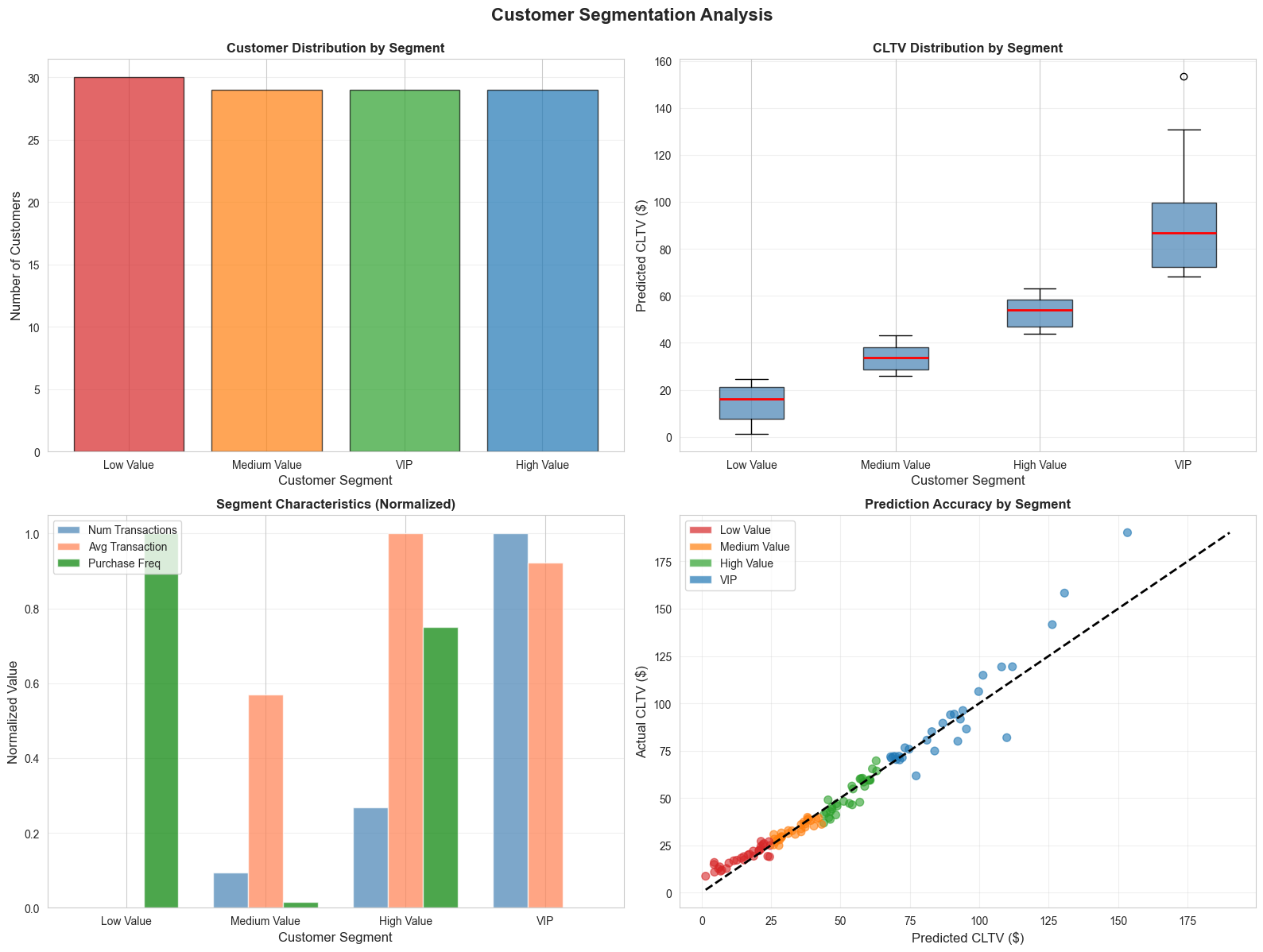
# Create customer segments based on predicted CLTV
customer_features_test = customer_features.loc[X_test.index].copy()
customer_features_test['predicted_cltv'] = y_test_pred
customer_features_test['actual_cltv'] = y_test.values
customer_features_test['prediction_error'] = customer_features_test['actual_cltv'] - customer_features_test['predicted_cltv']
customer_features_test['prediction_error_pct'] = (customer_features_test['prediction_error'] / customer_features_test['actual_cltv'] * 100)
# Define CLTV segments
cltv_percentiles = customer_features_test['predicted_cltv'].quantile([0.25, 0.50, 0.75])
def assign_segment(cltv):
if cltv <= cltv_percentiles[0.25]:
return 'Low Value'
elif cltv <= cltv_percentiles[0.50]:
return 'Medium Value'
elif cltv <= cltv_percentiles[0.75]:
return 'High Value'
else:
return 'VIP'
customer_features_test['segment'] = customer_features_test['predicted_cltv'].apply(assign_segment)
# Segment analysis
segment_summary = customer_features_test.groupby('segment').agg({
'customer_id': 'count',
'predicted_cltv': ['mean', 'median', 'min', 'max'],
'num_transactions': 'mean',
'avg_transaction': 'mean',
'purchase_frequency': 'mean',
'recency_days': 'mean'
}).round(2)
print("\n" + "="*100)
print("=== CUSTOMER SEGMENTATION BY PREDICTED CLTV ===")
print("="*100)
print(segment_summary)
print("="*100)
# Visualize segments
fig, axes = plt.subplots(2, 2, figsize=(16, 12))
fig.suptitle('Customer Segmentation Analysis', fontsize=16, fontweight='bold', y=0.995)
# 1. Segment distribution
segment_counts = customer_features_test['segment'].value_counts()
colors_seg = ['#d62728', '#ff7f0e', '#2ca02c', '#1f77b4']
axes[0, 0].bar(segment_counts.index, segment_counts.values, color=colors_seg, alpha=0.7, edgecolor='black')
axes[0, 0].set_xlabel('Customer Segment', fontsize=12)
axes[0, 0].set_ylabel('Number of Customers', fontsize=12)
axes[0, 0].set_title('Customer Distribution by Segment', fontweight='bold')
axes[0, 0].grid(alpha=0.3, axis='y')
# 2. CLTV by segment
segment_order = ['Low Value', 'Medium Value', 'High Value', 'VIP']
customer_features_test['segment'] = pd.Categorical(customer_features_test['segment'],
categories=segment_order, ordered=True)
customer_features_test_sorted = customer_features_test.sort_values('segment')
axes[0, 1].boxplot([customer_features_test_sorted[customer_features_test_sorted['segment']==seg]['predicted_cltv']
for seg in segment_order],
labels=segment_order, patch_artist=True,
boxprops=dict(facecolor='steelblue', alpha=0.7),
medianprops=dict(color='red', linewidth=2))
axes[0, 1].set_xlabel('Customer Segment', fontsize=12)
axes[0, 1].set_ylabel('Predicted CLTV ($)', fontsize=12)
axes[0, 1].set_title('CLTV Distribution by Segment', fontweight='bold')
axes[0, 1].grid(alpha=0.3, axis='y')
# 3. Segment characteristics
segment_chars = customer_features_test.groupby('segment')[['num_transactions', 'avg_transaction',
'purchase_frequency']].mean()
segment_chars_norm = (segment_chars - segment_chars.min()) / (segment_chars.max() - segment_chars.min())
x = np.arange(len(segment_order))
width = 0.25
axes[1, 0].bar(x - width, segment_chars_norm.loc[segment_order, 'num_transactions'],
width, label='Num Transactions', color='steelblue', alpha=0.7)
axes[1, 0].bar(x, segment_chars_norm.loc[segment_order, 'avg_transaction'],
width, label='Avg Transaction', color='coral', alpha=0.7)
axes[1, 0].bar(x + width, segment_chars_norm.loc[segment_order, 'purchase_frequency'],
width, label='Purchase Freq', color='green', alpha=0.7)
axes[1, 0].set_xlabel('Customer Segment', fontsize=12)
axes[1, 0].set_ylabel('Normalized Value', fontsize=12)
axes[1, 0].set_title('Segment Characteristics (Normalized)', fontweight='bold')
axes[1, 0].set_xticks(x)
axes[1, 0].set_xticklabels(segment_order)
axes[1, 0].legend()
axes[1, 0].grid(alpha=0.3, axis='y')
# 4. Prediction accuracy by segment
axes[1, 1].scatter(customer_features_test['predicted_cltv'],
customer_features_test['actual_cltv'],
c=[colors_seg[segment_order.index(s)] for s in customer_features_test['segment']],
alpha=0.6, s=50)
min_val = min(customer_features_test['predicted_cltv'].min(), customer_features_test['actual_cltv'].min())
max_val = max(customer_features_test['predicted_cltv'].max(), customer_features_test['actual_cltv'].max())
axes[1, 1].plot([min_val, max_val], [min_val, max_val], 'k--', lw=2)
axes[1, 1].set_xlabel('Predicted CLTV ($)', fontsize=12)
axes[1, 1].set_ylabel('Actual CLTV ($)', fontsize=12)
axes[1, 1].set_title('Prediction Accuracy by Segment', fontweight='bold')
axes[1, 1].grid(alpha=0.3)
# Create legend
from matplotlib.patches import Patch
legend_elements = [Patch(facecolor=colors_seg[i], label=segment_order[i], alpha=0.7)
for i in range(len(segment_order))]
axes[1, 1].legend(handles=legend_elements, loc='upper left')
plt.tight_layout()
plt.show()
11.7 Interpreting Regression Outputs for Managers
Translating technical regression results into actionable business insights is a critical skill. Managers need to understand what the model tells them and how to use it for decision-making.
Key Elements of Manager-Friendly Interpretation
1. Model Performance in Business Terms
Technical : "The model has an R² of 0.78 and RMSE of $45.23"
Manager-Friendly : "Our model explains 78% of the variation in customer lifetime value, with an average prediction error of $45. This means we can reliably identify high-value customers and allocate marketing resources accordingly."
2. Feature Importance and Business Drivers
Technical : "The coefficient for purchase_frequency is 12.5 (p < 0.001)"
Manager-Friendly : "Purchase frequency is the strongest predictor of customer value. Customers who buy one additional time per month are worth $12.50 more on average. This suggests retention programs should focus on increasing purchase frequency."
3. Actionable Recommendations
# Generate business recommendations based on model insights
print("\n" + "="*100)
print("=== BUSINESS RECOMMENDATIONS: CLTV MODEL ===")
print("="*100)
# Top 3 positive drivers
top_positive = feature_importance[feature_importance['Coefficient'] > 0].head(3)
print("\n📈 TOP DRIVERS OF CUSTOMER VALUE:")
for idx, row in top_positive.iterrows():
print(f" {idx+1}. {row['Feature']}: +${abs(row['Coefficient']):.2f} per unit increase")
print("\n💡 STRATEGIC IMPLICATIONS:")
print(" • Focus retention efforts on increasing purchase frequency")
print(" • Encourage higher average transaction values through upselling")
print(" • Implement loyalty programs to extend customer lifetime")
# Segment-specific strategies
print("\n🎯 SEGMENT-SPECIFIC STRATEGIES:")
print("\n VIP Customers (Top 25%):")
print(" • Predicted CLTV: $" + f"{segment_summary.loc['VIP', ('predicted_cltv', 'mean')]:.2f}")
print(" • Strategy: White-glove service, exclusive offers, dedicated account management")
print(" • Expected ROI: High - these customers drive disproportionate revenue")
print("\n High Value Customers (50-75th percentile):")
print(" • Predicted CLTV: $" + f"{segment_summary.loc['High Value', ('predicted_cltv', 'mean')]:.2f}")
print(" • Strategy: Upgrade campaigns, loyalty rewards, personalized recommendations")
print(" • Expected ROI: Medium-High - potential to move into VIP tier")
print("\n Medium Value Customers (25-50th percentile):")
print(" • Predicted CLTV: $" + f"{segment_summary.loc['Medium Value', ('predicted_cltv', 'mean')]:.2f}")
print(" • Strategy: Engagement campaigns, cross-sell opportunities, frequency incentives")
print(" • Expected ROI: Medium - focus on increasing purchase frequency")
print("\n Low Value Customers (Bottom 25%):")
print(" • Predicted CLTV: $" + f"{segment_summary.loc['Low Value', ('predicted_cltv', 'mean')]:.2f}")
print(" • Strategy: Automated nurturing, cost-efficient channels, win-back campaigns")
print(" • Expected ROI: Low-Medium - minimize acquisition costs, focus on activation")
print("\n📊 MODEL CONFIDENCE AND LIMITATIONS:")
print(f" • Prediction accuracy: ±${mean_absolute_error(y_test, y_test_pred):.2f} on average")
print(f" • Model explains {r2_score(y_test, y_test_pred)*100:.1f}% of customer value variation")
print(" • Remaining variation likely due to: external factors, competitive actions, life events")
print(" • Recommendation: Update model quarterly with new transaction data")
print("\n💰 EXPECTED BUSINESS IMPACT:")
total_predicted_value = customer_features_test['predicted_cltv'].sum()
vip_value = customer_features_test[customer_features_test['segment']=='VIP']['predicted_cltv'].sum()
vip_pct = (vip_value / total_predicted_value) * 100
print(f" • Total predicted customer value: ${total_predicted_value:,.2f}")
print(f" • VIP segment represents {vip_pct:.1f}% of total value")
print(f" • Retaining just 5% more VIP customers = ${vip_value * 0.05:,.2f} additional revenue")
print(" • ROI of targeted retention: Estimated 3-5x marketing spend")
print("="*100)
Creating an Executive Summary
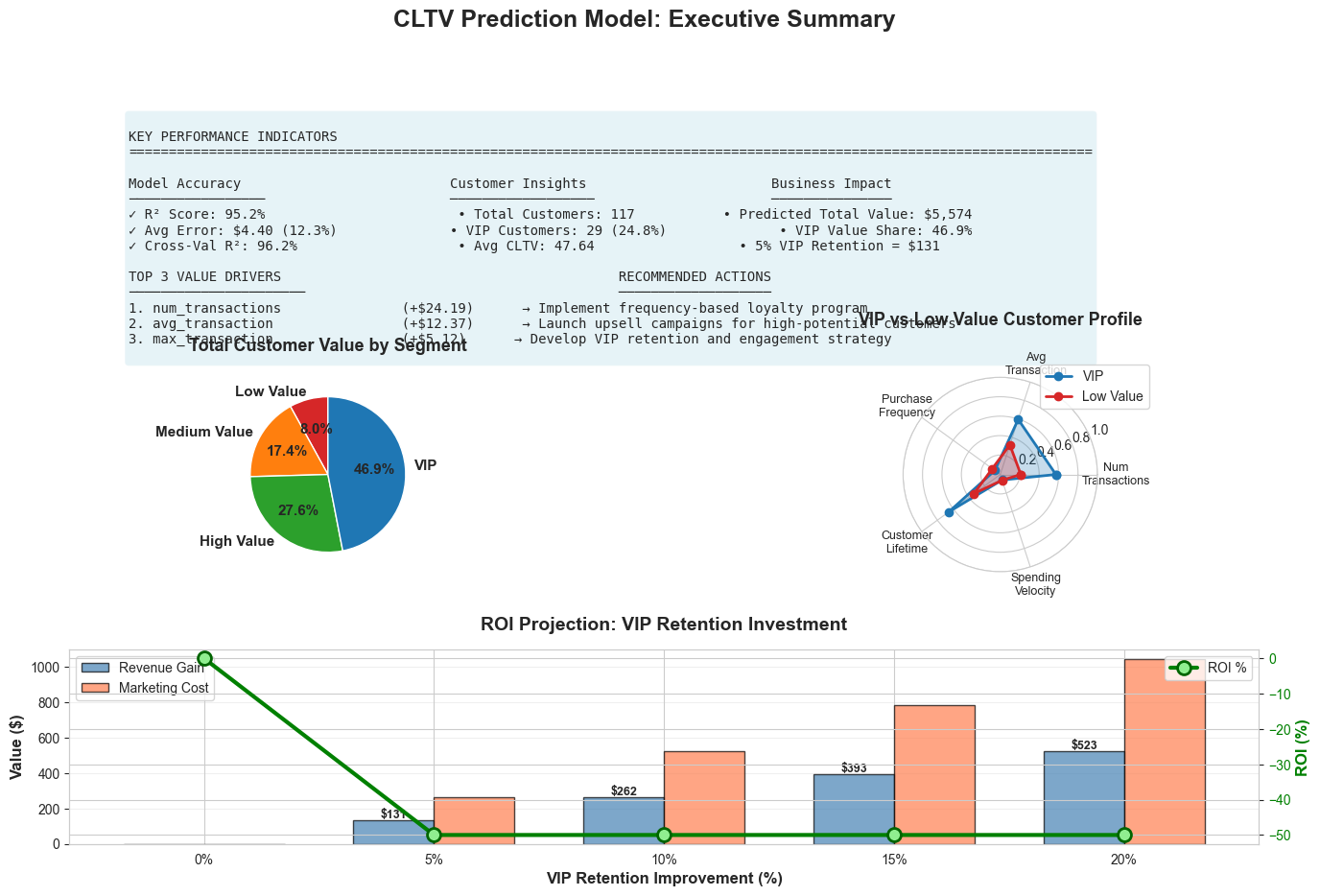
# Generate executive summary visualization
fig = plt.figure(figsize=(16, 10))
gs = fig.add_gridspec(3, 2, hspace=0.4, wspace=0.3)
fig.suptitle('CLTV Prediction Model: Executive Summary',
fontsize=18, fontweight='bold', y=0.98)
# 1. Key Metrics Dashboard
ax1 = fig.add_subplot(gs[0, :])
ax1.axis('off')
metrics_summary = f"""
KEY PERFORMANCE INDICATORS
{'='*120}
Model Accuracy Customer Insights Business Impact
───────────────── ────────────────── ───────────────
✓ R² Score: {r2_score(y_test, y_test_pred):.1%} • Total Customers: {len(customer_features_test):,} • Predicted Total Value: ${total_predicted_value:,.0f}
✓ Avg Error: ${mean_absolute_error(y_test, y_test_pred):.2f} ({np.mean(np.abs(test_pct_error)):.1f}%) • VIP Customers: {len(customer_features_test[customer_features_test['segment']=='VIP']):,} ({len(customer_features_test[customer_features_test['segment']=='VIP'])/len(customer_features_test)*100:.1f}%) • VIP Value Share: {vip_pct:.1f}%
✓ Cross-Val R²: {results_df[results_df['Model']==best_model_name]['CV R² (mean)'].values[0]:.1%} • Avg CLTV: ${customer_features_test['predicted_cltv'].mean():.2f} • 5% VIP Retention = ${vip_value * 0.05:,.0f}
TOP 3 VALUE DRIVERS RECOMMENDED ACTIONS
────────────────────── ───────────────────
1. {top_positive.iloc[0]['Feature']:30s} (+${abs(top_positive.iloc[0]['Coefficient']):.2f}) → Implement frequency-based loyalty program
2. {top_positive.iloc[1]['Feature']:30s} (+${abs(top_positive.iloc[1]['Coefficient']):.2f}) → Launch upsell campaigns for high-potential customers
3. {top_positive.iloc[2]['Feature']:30s} (+${abs(top_positive.iloc[2]['Coefficient']):.2f}) → Develop VIP retention and engagement strategy
"""
ax1.text(0.05, 0.95, metrics_summary, transform=ax1.transAxes, fontsize=10,
verticalalignment='top', fontfamily='monospace',
bbox=dict(boxstyle='round', facecolor='lightblue', alpha=0.3))
# 2. Customer Value Distribution
ax2 = fig.add_subplot(gs[1, 0])
segment_values = customer_features_test.groupby('segment')['predicted_cltv'].sum().loc[segment_order]
colors_pie = ['#d62728', '#ff7f0e', '#2ca02c', '#1f77b4']
wedges, texts, autotexts = ax2.pie(segment_values, labels=segment_order, autopct='%1.1f%%',
colors=colors_pie, startangle=90,
textprops={'fontsize': 11, 'fontweight': 'bold'})
ax2.set_title('Total Customer Value by Segment', fontsize=13, fontweight='bold', pad=20)
# 3. Segment Characteristics Radar
ax3 = fig.add_subplot(gs[1, 1], projection='polar')
categories = ['Num\nTransactions', 'Avg\nTransaction', 'Purchase\nFrequency',
'Customer\nLifetime', 'Spending\nVelocity']
N = len(categories)
# Get data for VIP vs Low Value comparison
vip_data = customer_features_test[customer_features_test['segment']=='VIP'][
['num_transactions', 'avg_transaction', 'purchase_frequency',
'customer_lifetime_days', 'spending_velocity']].mean()
low_data = customer_features_test[customer_features_test['segment']=='Low Value'][
['num_transactions', 'avg_transaction', 'purchase_frequency',
'customer_lifetime_days', 'spending_velocity']].mean()
# Normalize
max_vals = customer_features_test[['num_transactions', 'avg_transaction', 'purchase_frequency',
'customer_lifetime_days', 'spending_velocity']].max()
vip_norm = (vip_data / max_vals).values
low_norm = (low_data / max_vals).values
angles = np.linspace(0, 2 * np.pi, N, endpoint=False).tolist()
vip_norm = np.concatenate((vip_norm, [vip_norm[0]]))
low_norm = np.concatenate((low_norm, [low_norm[0]]))
angles += angles[:1]
ax3.plot(angles, vip_norm, 'o-', linewidth=2, label='VIP', color='#1f77b4')
ax3.fill(angles, vip_norm, alpha=0.25, color='#1f77b4')
ax3.plot(angles, low_norm, 'o-', linewidth=2, label='Low Value', color='#d62728')
ax3.fill(angles, low_norm, alpha=0.25, color='#d62728')
ax3.set_xticks(angles[:-1])
ax3.set_xticklabels(categories, fontsize=9)
ax3.set_ylim(0, 1)
ax3.set_title('VIP vs Low Value Customer Profile', fontsize=13, fontweight='bold', pad=20)
ax3.legend(loc='upper right', bbox_to_anchor=(1.3, 1.1))
ax3.grid(True)
# 4. ROI Projection
ax4 = fig.add_subplot(gs[2, :])
# Simulate ROI scenarios
retention_improvements = np.array([0, 5, 10, 15, 20]) # % improvement
vip_base_value = vip_value
marketing_cost_per_pct = vip_base_value * 0.02 # 2% of value per 1% retention improvement
revenue_gain = vip_base_value * (retention_improvements / 100)
marketing_cost = marketing_cost_per_pct * retention_improvements
net_benefit = revenue_gain - marketing_cost
roi = (net_benefit / marketing_cost) * 100
roi[0] = 0 # Avoid division by zero
x_pos = np.arange(len(retention_improvements))
width = 0.35
bars1 = ax4.bar(x_pos - width/2, revenue_gain, width, label='Revenue Gain',
color='steelblue', alpha=0.7, edgecolor='black')
bars2 = ax4.bar(x_pos + width/2, marketing_cost, width, label='Marketing Cost',
color='coral', alpha=0.7, edgecolor='black')
# Add net benefit line
ax4_twin = ax4.twinx()
line = ax4_twin.plot(x_pos, roi, 'go-', linewidth=3, markersize=10,
label='ROI %', markerfacecolor='lightgreen', markeredgecolor='darkgreen',
markeredgewidth=2)
ax4.set_xlabel('VIP Retention Improvement (%)', fontsize=12, fontweight='bold')
ax4.set_ylabel('Value ($)', fontsize=12, fontweight='bold')
ax4_twin.set_ylabel('ROI (%)', fontsize=12, fontweight='bold', color='green')
ax4.set_title('ROI Projection: VIP Retention Investment', fontsize=14, fontweight='bold', pad=15)
ax4.set_xticks(x_pos)
ax4.set_xticklabels([f'{x}%' for x in retention_improvements])
ax4.legend(loc='upper left', fontsize=10)
ax4_twin.legend(loc='upper right', fontsize=10)
ax4.grid(alpha=0.3, axis='y')
ax4_twin.tick_params(axis='y', labelcolor='green')
# Add value labels on bars
for bar in bars1:
height = bar.get_height()
if height > 0:
ax4.text(bar.get_x() + bar.get_width()/2., height,
f'${height:,.0f}', ha='center', va='bottom', fontsize=9, fontweight='bold')
plt.tight_layout()
plt.show()
===================================================================================
=================== BUSINESS RECOMMENDATIONS: CLTV MODEL ==========================
===================================================================================
📈 TOP DRIVERS OF CUSTOMER VALUE:
1. num_transactions: +$24.19 per unit increase
2. avg_transaction: +$12.37 per unit increase
5. max_transaction: +$5.12 per unit increase
💡 STRATEGIC IMPLICATIONS:
• Focus retention efforts on increasing purchase frequency
• Encourage higher average transaction values through upselling
• Implement loyalty programs to extend customer lifetime
🎯 SEGMENT-SPECIFIC STRATEGIES:
VIP Customers (Top 25%):
• Predicted CLTV: $90.23
• Strategy: White-glove service, exclusive offers, dedicated account management
• Expected ROI: High - these customers drive disproportionate revenue
High Value Customers (50-75th percentile):
• Predicted CLTV: $53.07
• Strategy: Upgrade campaigns, loyalty rewards, personalized recommendations
• Expected ROI: Medium-High - potential to move into VIP tier
Medium Value Customers (25-50th percentile):
• Predicted CLTV: $33.49
• Strategy: Engagement campaigns, cross-sell opportunities, frequency incentives
• Expected ROI: Medium - focus on increasing purchase frequency
Low Value Customers (Bottom 25%):
• Predicted CLTV: $14.91
• Strategy: Automated nurturing, cost-efficient channels, win-back campaigns
• Expected ROI: Low-Medium - minimize acquisition costs, focus on activation
📊 MODEL CONFIDENCE AND LIMITATIONS:
• Prediction accuracy: ±$4.40 on average
• Model explains 95.2% of customer value variation
• Remaining variation likely due to: external factors, competitive actions, life events
• Recommendation: Update model quarterly with new transaction data
💰 EXPECTED BUSINESS IMPACT:
• Total predicted customer value: $5,574.09
• VIP segment represents 46.9% of total value
• Retaining just 5% more VIP customers = $130.84 additional revenue
• ROI of targeted retention: Estimated 3-5x marketing spend
Important Metrics for Regression Models
Model Performance Metrics
|
Metric |
Formula |
Interpretation |
Business Use |
|
R² (R-squared) |
1 - (SS_res / SS_tot) |
% of variance explained (0-1) |
Overall model fit |
|
Adjusted R² |
1 - [(1-R²)(n-1)/(n-k-1)] |
R² adjusted for # of predictors |
Compare models with different features |
|
RMSE |
√(Σ(y - ŷ)² / n) |
Average prediction error (same units as y) |
Prediction accuracy in dollars/units |
|
MAE |
Σ|y - ŷ| / n |
Average absolute error (same units as y) |
Typical prediction error |
|
MAPE |
(Σ|y - ŷ|/y) / n × 100 |
Average % error |
Relative accuracy across scales |
|
AIC/BIC |
-2log(L) + 2k |
Model complexity penalty |
Model selection |
Coefficient Interpretation Metrics
|
Metric |
Purpose |
Interpretation |
|
Coefficient (β) |
Effect size |
Change in Y per unit change in X |
|
Standard Error |
Coefficient uncertainty |
Precision of estimate |
|
t-statistic |
Significance test |
Coefficient / Standard Error |
|
p-value |
Statistical significance |
Probability coefficient = 0 |
|
Confidence Interval |
Range of plausible values |
95% CI for coefficient |
|
VIF |
Multicollinearity |
>10 indicates high correlation |
# Calculate comprehensive metrics
from scipy import stats as scipy_stats
print("\n" + "="*100)
print("=== COMPREHENSIVE MODEL METRICS ===")
print("="*100)
# Performance metrics
print("\n📊 PERFORMANCE METRICS:")
print(f" R² Score (Test): {r2_score(y_test, y_test_pred):.4f}")
print(f" Adjusted R²: {1 - (1-r2_score(y_test, y_test_pred))*(len(y_test)-1)/(len(y_test)-X_test.shape[1]-1):.4f}")
print(f" RMSE: ${np.sqrt(mean_squared_error(y_test, y_test_pred)):.2f}")
print(f" MAE: ${mean_absolute_error(y_test, y_test_pred):.2f}")
print(f" MAPE: {np.mean(np.abs(test_pct_error)):.2f}%")
# Residual diagnostics
print("\n🔍 RESIDUAL DIAGNOSTICS:")
print(f" Mean Residual: ${np.mean(test_residuals):.2f} (should be ~0)")
print(f" Std Residual: ${np.std(test_residuals):.2f}")
print(f" Skewness: {scipy_stats.skew(test_residuals):.3f} (should be ~0)")
print(f" Kurtosis: {scipy_stats.kurtosis(test_residuals):.3f} (should be ~0)")
# Normality test
_, p_value_normality = scipy_stats.normaltest(train_residuals)
print(f" Normality Test (p-value): {p_value_normality:.4f} {'✓' if p_value_normality > 0.05 else '⚠'}")
print("="*100)
====================================================================================== COMPREHENSIVE MODEL METRICS ====================
📊 PERFORMANCE METRICS:
R² Score (Test): 0.9521
Adjusted R²: 0.9461
RMSE: $6.97
MAE: $4.40
MAPE: 12.32%
🔍 RESIDUAL DIAGNOSTICS:
Mean Residual: $0.94 (should be ~0)
Std Residual: $6.91
Skewness: 0.925 (should be ~0)
Kurtosis: 8.818 (should be ~0)
Normality Test (p-value): 0.0000 ⚠
===================================================================================
AI Prompts for Model Diagnostics and Improvement
Leveraging AI assistants can significantly accelerate regression modeling workflows. Here are effective prompts for different stages of model development.
1. Data Exploration and Preparation
PROMPT: "I have a customer transaction dataset with columns: customer_id, transaction_date,
and amount. I want to predict customer lifetime value. What features should I engineer? Provide Python code using pandas to create RFM (Recency, Frequency, Monetary) features and other relevant predictors."
PROMPT: "My target variable (revenue) is highly right-skewed with values ranging from $10 to $50,000. What transformations should I consider? Show me Python code to compare log, square root, and Box-Cox transformations with before/after visualizations."
PROMPT: "I have missing values in 15% of my predictor variables. What are the best
imputation strategies for regression models? Provide code to compare mean, median,
and KNN imputation methods and evaluate their impact on model performance."
2. Model Building and Selection
PROMPT: "I'm building a linear regression model with 20 features and 500 observations.
Some features are highly correlated (VIF > 10). Should I use Ridge, Lasso, or Elastic Net?
Provide Python code to compare all three with cross-validation and visualize coefficient
paths."
PROMPT: "My regression model has R² = 0.92 on training data but only 0.65 on test data.
This suggests overfitting. Provide a systematic approach to diagnose and fix this issue,
including Python code for regularization, feature selection, and cross-validation."
PROMPT: "I need to select the optimal alpha parameter for Ridge regression. Show me Python
code to perform grid search with cross-validation, plot validation curves, and select the
best alpha based on the bias-variance tradeoff."
3. Diagnostic Checks
PROMPT: "Generate comprehensive regression diagnostics for my model including: residual
plots, Q-Q plot, scale-location plot, and Cook's distance. Provide Python code using
matplotlib and scipy, and explain what each plot tells me about model assumptions."
PROMPT: "My residual vs. fitted plot shows a funnel shape (heteroscedasticity). What does
this mean for my model? Provide Python code to: 1) Test for heteroscedasticity formally,
2) Apply weighted least squares, 3) Use robust standard errors, and 4) Compare results."
PROMPT: "I suspect multicollinearity in my regression model. Provide Python code to:
1) Calculate VIF for all features, 2) Create a correlation heatmap, 3) Identify problematic
features, and 4) Suggest remedies (feature removal, PCA, or regularization)."
4. Model Interpretation
PROMPT: "I have a multiple regression model predicting sales with coefficients for price
(-2.5), advertising (1.8), and seasonality (0.3). Help me write a manager-friendly
interpretation of these results, including practical business implications and confidence
intervals."
PROMPT: "My regression model includes interaction terms (price × quality). How do I
interpret the coefficients? Provide Python code to visualize the interaction effect
and create a simple explanation for non-technical stakeholders."
PROMPT: "Create a feature importance visualization for my regression model that shows:
1) Coefficient magnitudes, 2) Statistical significance (p-values), 3) Confidence intervals,
and 4) Standardized coefficients for fair comparison. Include Python code."
5. Model Improvement
PROMPT: "My linear regression model has R² = 0.60. I suspect non-linear relationships.
Provide Python code to: 1) Test for non-linearity, 2) Add polynomial features, 3) Try
log transformations, 4) Compare model performance, and 5) Visualize the improvements."
PROMPT: "I want to improve my regression model's predictive accuracy. Suggest a systematic
approach including: feature engineering ideas, interaction terms to test, transformation
strategies, and ensemble methods. Provide Python code for implementation."
PROMPT: "My model performs well on average but has large errors for high-value customers.
How can I improve predictions for this segment? Suggest approaches like: stratified
modeling, weighted regression, or quantile regression with Python implementation."
6. Validation and Deployment
PROMPT: "Create a comprehensive model validation report including: cross-validation scores,
train/test performance comparison, residual analysis, prediction intervals, and business
metrics (MAE, MAPE). Provide Python code to generate this report automatically."
PROMPT: "I need to explain my regression model's predictions to stakeholders. Create Python
code for: 1) SHAP values or partial dependence plots, 2) Individual prediction explanations,
3) Confidence intervals for predictions, and 4) Sensitivity analysis."
PROMPT: "Help me create a production-ready regression model pipeline including: data
preprocessing, feature engineering, model training, validation, and prediction with
confidence intervals. Provide Python code using scikit-learn pipelines."
7. Troubleshooting Specific Issues
PROMPT: "My regression model's residuals show a clear pattern (curved shape) in the
residual plot. What does this indicate and how do I fix it? Provide diagnostic code
and solutions."
PROMPT: "I have outliers in my dataset that are pulling my regression line. Should I
remove them? Provide Python code to: 1) Identify outliers using Cook's distance and
leverage, 2) Compare models with/without outliers, 3) Try robust regression methods."
PROMPT: "My regression coefficients have very large standard errors and wide confidence
intervals. What's causing this and how do I address it? Provide diagnostic code and
solutions (check multicollinearity, sample size, feature scaling)."
8. Business-Specific Applications
PROMPT: "I'm building a customer lifetime value prediction model. What are the most
important features to include? Provide Python code to engineer features from transaction
data including RFM metrics, cohort analysis, and behavioral patterns."
PROMPT: "Create a regression model to optimize marketing spend allocation across channels.
Include: 1) Diminishing returns (log transformation), 2) Interaction effects between
channels, 3) Seasonality, and 4) Budget constraints. Provide complete Python implementation."
PROMPT: "I need to forecast quarterly revenue using regression. Help me incorporate:
1) Trend and seasonality, 2) Leading indicators, 3) External factors, and 4) Prediction
intervals. Provide Python code with visualization of forecasts and uncertainty."
Chapter Summary
Regression analysis is a foundational technique for business analytics, enabling organizations to:
-
Understand Relationships
: Quantify how business drivers (price, marketing, quality) impact outcomes (sales, satisfaction, retention)
-
Make Predictions
: Forecast future values (revenue, demand, customer value) with quantified uncertainty
-
Optimize Decisions
: Identify which levers to pull and by how much to achieve business objectives
-
Communicate Insights
: Translate complex statistical relationships into actionable business recommendations
Key Takeaways:
- Start Simple : Begin with simple linear regression to understand relationships before adding complexity
- Check Assumptions : Always validate regression assumptions through diagnostic plots and tests
- Regularize When Needed : Use Ridge/Lasso when dealing with many features or multicollinearity
- Transform Appropriately : Apply log, polynomial, or interaction terms to capture non-linear relationships
- Validate Rigorously : Use cross-validation and hold-out test sets to ensure generalization
- Interpret Carefully : Consider both statistical significance and practical business significance
- Communicate Clearly : Translate technical results into manager-friendly insights with clear recommendations
- Leverage AI : Use AI assistants to accelerate diagnostics, troubleshooting, and model improvement
When to Use Regression:
- Continuous numeric outcomes
- Understanding cause-and-effect relationships
- Interpretability is important
- Need to quantify impact of changes
- Relatively linear relationships (or can be transformed)
When to Consider Alternatives:
- Categorical outcomes → Classification models
- Complex non-linear patterns → Tree-based models, neural networks
- No clear dependent variable → Clustering
- Causal inference required → Experimental design, causal methods
Exercises
Exercise 1: Fit a Multiple Linear Regression Model
Objective : Build and evaluate a regression model on a business dataset.
Tasks :
- Load the transactions dataset and engineer customer-level features
- Select at least 5 predictor variables
- Split data into training (80%) and test (20%) sets
- Fit a multiple linear regression model
- Calculate and interpret R², RMSE, and MAE
- Identify the top 3 most important features
Starter Code :
# Load and prepare data
df = pd.read_csv('transactions.csv')
# Engineer features (use code from section 11.6)
# ... your feature engineering code ...
# Select features and target
X = customer_features[['feature1', 'feature2', ...]] # Choose your features
y = customer_features['total_spent']
# Split data
X_train, X_test, y_train, y_test = train_test_split(X, y, test_size=0.2, random_state=42)
# Fit model
model = LinearRegression()
# ... complete the exercise ...
Deliverable : Python notebook with code, results, and interpretation
Exercise 2: Check and Interpret Regression Diagnostics
Objective : Validate regression assumptions and diagnose potential issues.
Tasks :
- Using your model from Exercise 1, create the following diagnostic plots:
- Actual vs. Predicted
- Residuals vs. Fitted
- Q-Q Plot
- Residual histogram
- Calculate VIF for all features to check multicollinearity
- Identify any outliers using Cook's distance
- Write a brief assessment (200-300 words) of whether the model meets regression assumptions
- Recommend specific improvements if assumptions are violated
Guiding Questions :
- Do residuals appear randomly scattered or show patterns?
- Are residuals normally distributed?
- Is there evidence of heteroscedasticity?
- Are any features highly correlated (VIF > 10)?
- Are there influential outliers?
Deliverable : Diagnostic plots and written assessment
Exercise 3: Compare OLS with Regularized Regression
Objective : Understand the impact of regularization on model performance.
Tasks :
- Standardize your features using StandardScaler
- Fit the following models:
- Ordinary Least Squares (LinearRegression)
- Ridge with α = [0.1, 1.0, 10.0]
- Lasso with α = [0.1, 1.0, 10.0]
- Elastic Net with α = 1.0, l1_ratio = 0.5
- Compare models using:
- Train R²
- Test R²
- Cross-validation R² (5-fold)
- Number of non-zero coefficients
- Create a coefficient path plot showing how coefficients change with α
- Select the best model and justify your choice
Evaluation Criteria :
- Test set performance
- Generalization (train vs. test gap)
- Model simplicity (fewer features preferred if performance is similar)
Deliverable : Comparison table, coefficient path plots, and model selection justification
Exercise 4: Write an Executive Briefing Note
Objective : Communicate regression results to non-technical stakeholders.
Tasks :
- Using your best model from Exercise 3, write a 1-page executive briefing note that includes:
- Business Context : What problem does the model solve?
- Key Findings : What are the top 3 drivers of the outcome?
- Model Performance : How accurate are the predictions? (use business-friendly language)
- Actionable Recommendations : What should the business do based on these insights?
- Limitations and Caveats : What should stakeholders be aware of?
- Include 1-2 visualizations that support your key messages
- Avoid technical jargon (no R², p-values, coefficients without context)
- Focus on business impact and ROI
Example Structure :
EXECUTIVE BRIEFING: Customer Lifetime Value Prediction Model
Date: [Date]
Prepared by: [Your Name]
BUSINESS CHALLENGE
[1-2 sentences on the problem]
KEY FINDINGS
• Finding 1: [Insight with business context]
• Finding 2: [Insight with business context]
• Finding 3: [Insight with business context]
MODEL PERFORMANCE
[Explain accuracy in business terms - e.g., "The model predicts customer value
within $50 on average, enabling reliable segmentation..."]
RECOMMENDED ACTIONS
1. [Specific action with expected impact]
2. [Specific action with expected impact]
3. [Specific action with expected impact]
EXPECTED BUSINESS IMPACT
[Quantify potential revenue, cost savings, or efficiency gains]
LIMITATIONS
[Brief note on what the model doesn't capture]
Deliverable : 1-page briefing note (PDF or Word document) with visualizations
Additional Resources
Books
- An Introduction to Statistical Learning by James, Witten, Hastie, Tibshirani (free PDF available)
- Practical Statistics for Data Scientists by Bruce & Bruce
- Applied Predictive Modeling by Kuhn & Johnson
Online Resources
Interactive Tools
Python Libraries
- scikit-learn : Machine learning models
- statsmodels : Statistical models with detailed diagnostics
- scipy : Statistical tests
- seaborn & matplotlib : Visualization